But for most established businesses, the question is not simply: “Can AI do this?”
The better question is: “Should AI do this without human review?”
For many enterprise workflows, the answer is no.
A finance team may use AI to identify invoice exceptions, but a person should still approve payment changes. A HR team may use AI to summarise candidate applications, but a person should still make hiring decisions. A compliance team may use AI to identify missing evidence, but a person should still confirm the final position. A customer service team may use AI to draft responses, but sensitive complaints may still need escalation.
This is where human-in-the-loop AI becomes essential.
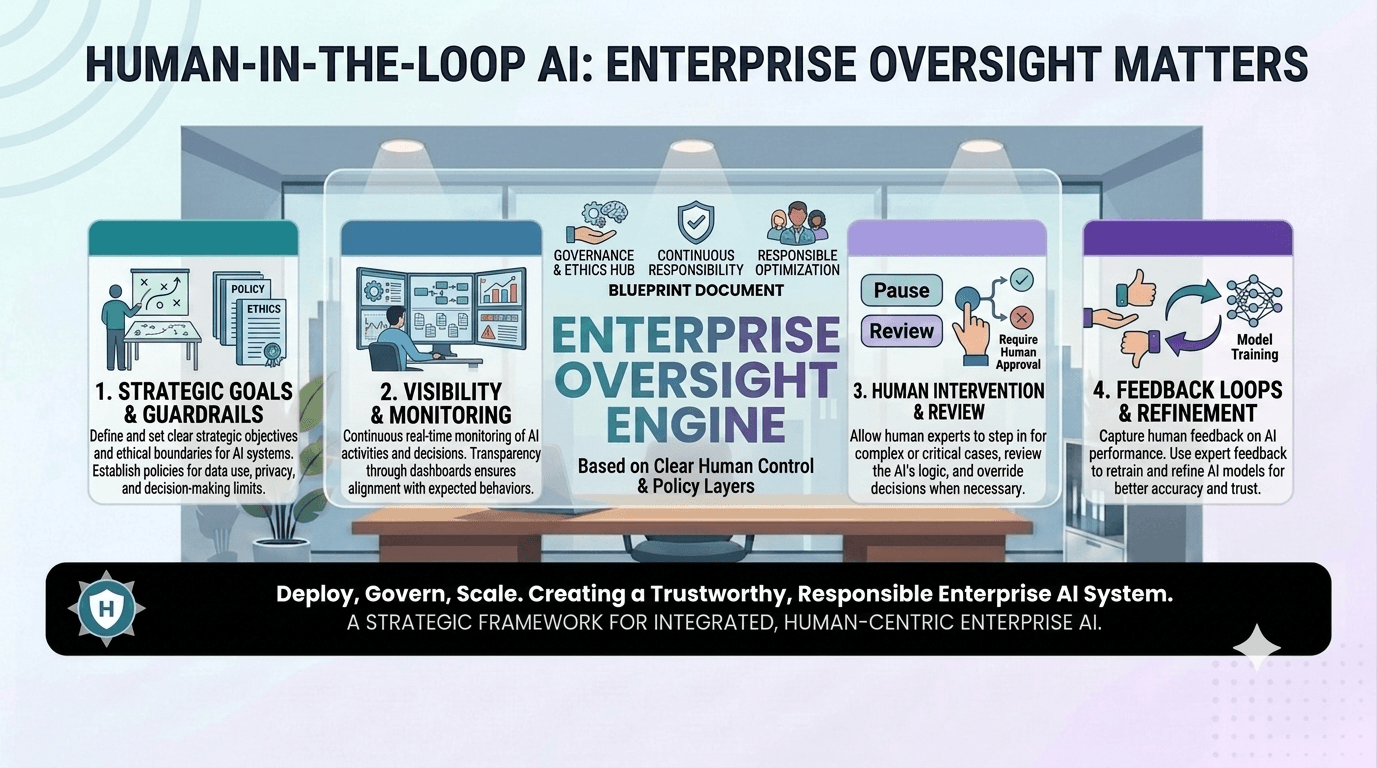
Human-in-the-loop AI allows businesses to gain the speed, consistency and productivity benefits of AI automation while keeping people involved at the right points. Instead of replacing human judgement, it places AI inside a controlled workflow where people approve, review, override, escalate or validate decisions when needed.
For enterprise teams, this is often the practical path to AI adoption. It addresses executive concerns about errors, risk, compliance, accountability and trust. It also makes AI easier for staff to adopt because the system is designed to support human decision-making rather than remove it entirely.
This article explains what human-in-the-loop AI means, where oversight matters most, how approval gates and escalation rules work, and how businesses can design AI workflows that balance speed with control.
Table of Contents
- What Is Human-in-the-Loop AI?
- Why Enterprise AI Still Needs Human Oversight
- Which Decisions Should Remain Human-Approved?
- Approval Gates, Escalation Rules and Exception Handling
- Examples of Human-in-the-Loop AI in Enterprise Workflows
- Audit Trails and Accountability
- How Human Oversight Improves AI Adoption
- How to Balance Speed With Control
- Implementation Framework for Human-in-the-Loop AI
- ROI: The Commercial Value of Human-in-the-Loop AI
- Security, Governance and Risk Considerations
- How Greenhat Can Help
- Conclusion
- FAQs
What Is Human-in-the-Loop AI?
Human-in-the-loop AI is an AI workflow design approach where people remain involved in reviewing, approving, correcting or escalating AI-generated outputs or decisions.
In simple terms, the AI does part of the work, but a human remains responsible for the final judgement where risk, uncertainty or accountability matters.
A human-in-the-loop AI system may allow AI to:
- Analyse documents
- Classify incoming requests
- Recommend next actions
- Draft emails or reports
- Detect anomalies
- Summarise customer interactions
- Extract data from forms
- Score risk levels
- Route work to the right person
- Prepare information for approval
But the human may still:
- Approve or reject recommendations
- Review sensitive outputs before they are sent
- Override incorrect classifications
- Escalate unusual cases
- Confirm compliance decisions
- Approve payments, refunds or contractual changes
- Validate outputs before they affect customers, staff or regulators
Human-in-the-loop AI is especially important in enterprise AI implementation because business workflows are rarely simple. They involve existing systems, approval pathways, compliance obligations, customer expectations, role-based permissions and internal accountability.
The goal is not to slow AI down unnecessarily. The goal is to design sensible oversight into the workflow so that AI can operate safely, reliably and usefully.
Why Enterprise AI Still Needs Human Oversight
Enterprise AI does not operate in a vacuum. It usually interacts with real business data, customer records, financial information, internal policies, contracts, staff data, operational systems and compliance processes.
That creates risk if AI is allowed to act without appropriate control.
AI systems can be highly useful, but they can also:
- Misinterpret context
- Produce incomplete summaries
- Make confident but incorrect recommendations
- Apply outdated policy information
- Miss exceptions
- Misclassify unusual cases
- Generate responses that require legal, compliance or brand review
- Recommend actions that are technically possible but commercially inappropriate
For a low-risk internal task, this may be acceptable. For a high-risk workflow, it is not.
An AI agent that summarises internal meeting notes may not need human approval every time. But an AI workflow that approves supplier payments, sends customer refund decisions, updates employee records or responds to regulatory matters should have stronger controls.
Human oversight is therefore not a sign that AI has failed. It is a sign that the organisation has designed AI implementation properly.
For mid-sized and large businesses, human-in-the-loop AI is often the difference between an AI experiment and an enterprise-ready system.
Which Decisions Should Remain Human-Approved?
Not every AI output needs human approval. The right level of oversight depends on the risk, complexity and consequence of the workflow.
A useful rule is this: the higher the consequence of an AI action, the stronger the human approval requirement should be.
Decisions that should usually remain human-approved
Human approval is generally required when an AI recommendation could affect:
| Workflow Area | Examples of Human-Approved Decisions |
|---|---|
| Finance | Payment approvals, credit notes, supplier changes, invoice disputes, unusual refunds |
| HR | Hiring decisions, termination support, disciplinary matters, performance assessments |
| Compliance | Regulatory submissions, breach reporting, audit conclusions, policy exceptions |
| Legal / Contracts | Contract changes, liability positions, dispute responses, formal notices |
| Customer Service | Sensitive complaints, compensation decisions, high-value customer issues |
| Healthcare / Clinical | Clinical judgement, treatment decisions, risk assessments, professional documentation |
| Education / Training | Assessment outcomes, regulatory evidence decisions, student progression issues |
| Operations | Major supplier decisions, stock write-offs, safety incidents, resource exceptions |
In these cases, AI may still be extremely useful. It can prepare the information, highlight the risks, identify missing data, draft the response or recommend next steps.
But the final decision should remain with an accountable person.
Decisions AI may be able to handle more independently
Some lower-risk tasks may not require human approval every time, especially after a system has been tested and validated.
Examples include:
- Routing support tickets by category
- Summarising internal notes
- Extracting non-sensitive data from standard forms
- Flagging incomplete records
- Drafting internal task updates
- Producing first-draft reports for review
- Identifying duplicate records
- Recommending knowledge base articles
- Sending low-risk internal notifications
Even then, good AI workflow design should include monitoring, logging, exception handling and a way for users to correct the system.
Human-in-the-loop AI is not always about approving every action. Sometimes it is about allowing humans to intervene when confidence is low, risk is high or the case falls outside normal rules.
Approval Gates, Escalation Rules and Exception Handling
A strong human-in-the-loop AI system does not simply add a “review” button at the end of a workflow. It defines where oversight is needed and why.
Three design elements are especially important:
- Approval gates
- Escalation rules
- Exception handling
Approval gates
An approval gate is a defined point in a workflow where AI cannot proceed without human confirmation.
For example:
- An AI agent drafts a customer response, but a manager must approve it before sending.
- An AI workflow identifies an invoice exception, but finance must approve payment.
- An AI tool prepares a compliance report, but the compliance lead must validate it before submission.
- An AI system recommends a refund, but a human must approve refunds above a certain value.
Approval gates are useful where the AI output may be correct most of the time, but the consequence of a mistake is significant.
Escalation rules
Escalation rules determine when a workflow should be moved to a more senior person, specialist team or manual review queue.
Escalation may be triggered by:
- Low AI confidence
- Missing information
- High dollar value
- Sensitive customer issue
- Legal or regulatory language
- Policy exception
- Unusual data pattern
- Repeated failed attempts
- Negative customer sentiment
- Security or privacy concern
For example, a customer service AI agent may be allowed to draft responses for simple product questions, but complaints involving legal threats, refunds above a threshold or vulnerable customers may be escalated immediately.
Exception handling
Exception handling defines what happens when the workflow does not fit the standard process.
This is critical because enterprise workflows often contain edge cases. A supplier invoice may not match a purchase order. A staff onboarding record may be incomplete. A customer may have multiple accounts. A student may have a special consideration request. A CRM record may conflict with finance system data.
A well-designed AI workflow should not force a poor decision when the data is unclear. It should stop, flag the issue and route it to the right person.
Good exception handling makes AI safer and more useful because it prevents automation from pushing uncertain work through the business unchecked.
Examples of Human-in-the-Loop AI in Enterprise Workflows
Human-in-the-loop AI becomes easier to understand when viewed through real business workflows. Below are practical examples across finance, compliance, HR and customer service.
Finance Example: Invoice Exception Handling
Scenario:
A mid-sized business receives hundreds or thousands of supplier invoices each month. The finance team manually checks invoices against purchase orders, supplier records and approval rules.
Problem:
The process is slow, repetitive and prone to bottlenecks. Staff spend too much time reviewing routine invoices and chasing exceptions.
AI-enabled solution:
An AI workflow extracts invoice data, checks it against purchase orders, identifies mismatches and classifies invoices as low-risk or exception-based.
Systems involved:
Finance system, ERP, supplier database, email inbox, document storage and dashboard.
Human oversight:
Low-risk invoices may be prepared for batch approval. Exceptions are routed to finance staff. High-value invoices, supplier bank account changes and mismatches require human approval.
Business outcome:
The finance team reduces manual review time while retaining control over payment risk. AI speeds up the workflow, but people remain accountable for approvals.
Compliance Example: Evidence Collection and Audit Preparation
Scenario:
A regulated business needs to maintain evidence that policies, training, reviews and operational controls are being followed.
Problem:
Compliance evidence is spread across emails, spreadsheets, document folders, LMS records, CRM notes and internal systems. Preparing for audits is time-consuming.
AI-enabled solution:
An AI agent searches approved systems, identifies missing evidence, summarises compliance status and prepares an audit readiness dashboard.
Systems involved:
Document management system, LMS, HR system, CRM, internal database, cloud storage and business intelligence dashboard.
Human oversight:
AI can identify potential gaps, but compliance staff validate the evidence, confirm interpretations and approve final audit responses.
Business outcome:
The organisation becomes more audit-ready without relying solely on manual evidence collection. Human reviewers retain control over regulatory conclusions.
HR Example: Candidate Shortlisting Support
Scenario:
A growing business receives large numbers of job applications for technical, administrative or operational roles.
Problem:
Managers spend hours reviewing resumes, screening candidates and preparing interview questions.
AI-enabled solution:
AI summarises applications, compares candidate experience against role criteria and prepares structured interview notes.
Systems involved:
Applicant tracking system, HR platform, email, document storage and internal role descriptions.
Human oversight:
AI does not make hiring decisions. HR and hiring managers review the summaries, check for fairness, consider context and make final decisions.
Business outcome:
The hiring process becomes more efficient while reducing the risk of over-reliance on automated candidate scoring.
Customer Service Example: Complaint Triage and Response Drafting
Scenario:
A customer support team receives a mix of simple queries, technical issues, refund requests and complaints.
Problem:
Staff spend significant time triaging tickets, identifying urgency and drafting similar responses.
AI-enabled solution:
An AI agent classifies tickets, summarises customer history, recommends priority levels and drafts suggested responses.
Systems involved:
Help desk, CRM, order system, knowledge base, email and reporting dashboard.
Human oversight:
Routine responses may be reviewed quickly. Complaints, refund disputes, legal threats, vulnerable customers and high-value accounts are escalated to senior staff.
Business outcome:
The support team responds faster while maintaining human judgement for sensitive customer matters.
Education Provider Example: Student Support Triage
Scenario:
A training provider manages student queries, assessment issues, progress monitoring and compliance obligations.
Problem:
Student support teams manually review messages, progress data and assessment status to determine who needs help.
AI-enabled solution:
AI monitors student progress, identifies risk indicators, summarises issues and recommends intervention pathways.
Systems involved:
LMS, student management system, assessment platform, support inbox, CRM and reporting dashboard.
Human oversight:
AI can flag at-risk students, but academic or support staff decide the intervention, approve communications and handle complex cases.
Business outcome:
Students receive earlier support, staff focus on higher-value intervention and the provider gains better visibility across learner risk.
Audit Trails and Accountability
Human-in-the-loop AI is not only about approval. It is also about accountability.
Enterprise AI systems should be able to show:
- What data the AI used
- What output the AI produced
- What confidence level or risk rating was assigned
- Who reviewed the output
- Who approved, edited or rejected it
- What changes were made
- When the decision occurred
- Which system received the final output
- Whether the decision was later overridden
- What exception pathway was followed
This creates an audit trail.
Audit trails matter because executives, managers, auditors, regulators and customers may need to understand how a decision was made.
Without audit trails, AI can become a black box inside the business. That creates risk. If an AI workflow sends the wrong communication, approves the wrong action or misses a compliance issue, the organisation needs to know what happened.
A good audit trail helps answer:
- Was the AI acting within its authorised workflow?
- Did the AI have access to the right data?
- Was the output reviewed by the right person?
- Was the decision consistent with policy?
- Was an exception escalated properly?
- Did staff override the AI recommendation?
- Is the issue caused by data quality, workflow design, model behaviour or user error?
For enterprise AI, this level of visibility is essential. It supports compliance, improves trust and allows the system to be refined over time.
How Human Oversight Improves AI Adoption
Many AI projects fail not because the technology is incapable, but because people do not trust the system enough to use it.
Staff may worry that:
- AI will make mistakes
- They will be blamed for AI outputs
- AI will replace their judgement
- The system will create more work
- Customers will receive poor responses
- Managers will not understand the limitations
- Compliance risks will increase
- Exceptions will be missed
Human-in-the-loop AI helps address these concerns.
When staff can review, edit, approve and override AI outputs, they are more likely to see AI as a support tool rather than a threat. They can experience the time-saving benefits without feeling that accountability has been removed from the people who understand the work.
This is especially important in established businesses where processes, systems and responsibilities have developed over many years.
AI adoption improves when people can see:
- Where AI fits into the workflow
- What AI is allowed to do
- What AI is not allowed to do
- When human approval is required
- How exceptions are handled
- Who is accountable for final decisions
- How errors are corrected
- How the system improves over time
Human oversight is therefore not only a risk control. It is a change management tool.
How to Balance Speed With Control
A common executive concern is that human oversight will reduce the efficiency gains of AI.
This can happen if every AI output requires unnecessary review. But well-designed human-in-the-loop AI does not treat every task the same. It applies oversight based on risk.
The aim is to create a tiered workflow.
Low-risk work
AI may proceed with minimal human involvement.
Examples:
- Internal summaries
- Basic classification
- Draft task updates
- Knowledge base suggestions
- Low-risk data extraction
- Non-sensitive internal notifications
Medium-risk work
AI prepares the output, and humans review before action.
Examples:
- Customer response drafts
- Internal reports
- Standard compliance summaries
- Invoice exception recommendations
- CRM update suggestions
- HR policy answers
High-risk work
AI supports the workflow, but humans must approve final decisions.
Examples:
- Financial approvals
- Legal or compliance responses
- Hiring decisions
- Customer compensation
- Regulatory submissions
- Contractual changes
- Sensitive HR matters
This approach allows businesses to gain speed where risk is low and retain control where accountability matters.
The best AI workflows do not simply automate everything. They automate the right parts of the process and preserve human judgement at the right points.
Implementation Framework for Human-in-the-Loop AI
Implementing human-in-the-loop AI requires more than selecting an AI model. It requires workflow design, system integration, governance and testing.
A practical implementation pathway includes the following steps.
1. Identify the workflow or operational problem
Start with a specific business problem.
For example:
- Invoice approvals are slow
- Customer tickets are not triaged consistently
- Compliance evidence is difficult to find
- Sales proposals take too long to prepare
- Staff spend hours summarising documents
- Managers lack real-time visibility over exceptions
Avoid starting with a broad goal such as “we need AI”. Start with a workflow where AI can create measurable value.
2. Map the current process
Document how the process currently works.
Include:
- Systems involved
- People involved
- Data inputs
- Decisions made
- Approval steps
- Exceptions
- Bottlenecks
- Manual rework
- Outputs
- Reporting requirements
This step is critical. AI should not be placed on top of a poorly understood process.
3. Assess AI suitability
Determine what role AI should play.
The workflow may require:
- Classification
- Summarisation
- Data extraction
- Draft generation
- Recommendation
- Anomaly detection
- Workflow routing
- Decision support
- Report generation
- System orchestration
Some parts may be better handled by rules-based automation. Others may require AI. Many enterprise workflows use both.
4. Define human approval points
Decide where human review is required.
Questions to ask include:
- What decisions must remain human-approved?
- What outputs can be sent automatically?
- What dollar thresholds require review?
- What confidence levels trigger escalation?
- What customer types require special handling?
- What compliance issues require senior approval?
- Who can override the AI?
- Who is accountable for final decisions?
These rules should be designed before the system is built.
5. Design escalation and exception pathways
AI should know when not to proceed.
Define what happens when:
- Data is missing
- The AI confidence level is low
- The matter is high-risk
- Systems disagree
- The customer is sensitive
- A policy exception is detected
- The request is outside the AI’s scope
- A human rejects the AI recommendation
Good exception handling prevents AI from forcing uncertain work through a workflow.
6. Integrate with existing systems
Human-in-the-loop AI becomes far more valuable when it connects with existing business systems.
This may include:
- CRMs
- ERPs
- Finance systems
- LMS platforms
- Help desk software
- HR platforms
- Databases
- Email inboxes
- Document repositories
- Dashboards
- Cloud services
- Internal applications
Integration allows AI to work with real business context rather than isolated prompts.
7. Build a small, testable first version
Start with a controlled workflow.
For example:
- One invoice exception process
- One customer service queue
- One compliance evidence workflow
- One internal reporting process
- One HR support workflow
A small first version allows the business to test accuracy, user experience, approval rules, audit logging and ROI before expanding.
8. Add governance, logging and audit trails
Every serious enterprise AI workflow should include logging.
Track:
- Inputs
- Outputs
- AI recommendations
- Human approvals
- Human edits
- Overrides
- Escalations
- Exceptions
- Errors
- System actions
- Timestamps
- User roles
This supports accountability and continuous improvement.
9. Measure ROI and performance
Track whether the workflow is improving.
Useful measures include:
- Manual hours saved
- Turnaround time reduction
- Error reduction
- Faster escalation
- Fewer missed exceptions
- Improved reporting
- Reduced rework
- Higher customer satisfaction
- Better compliance readiness
- Increased team capacity
AI implementation should be judged by business outcomes, not novelty.
10. Scale responsibly
Once the first workflow is stable, expand to adjacent workflows.
For example, a customer service triage agent may expand into complaint summarisation, knowledge base recommendations and customer sentiment reporting. A finance exception workflow may expand into reconciliation support or cashflow reporting.
Scaling should follow evidence, not hype.
ROI: The Commercial Value of Human-in-the-Loop AI
Some executives assume human oversight reduces AI ROI. In reality, it often improves ROI because it makes AI safe enough to use in valuable workflows.
Low-risk automations can save time. But many of the highest-value enterprise workflows involve risk, judgement and accountability. Without human-in-the-loop design, those workflows may never be approved for AI use.
Human-in-the-loop AI can create ROI through:
- Reduced manual review time
- Faster turnaround
- Fewer errors
- Better exception handling
- Reduced rework
- More consistent decision support
- Improved compliance readiness
- Better customer experience
- Increased staff capacity
- Avoided headcount growth
- Improved reporting and visibility
For example, if a finance workflow consumes 40 staff hours per week and AI reduces manual effort by 50%, the business may recover approximately 20 hours per week for higher-value work.
But the ROI is not only labour saving.
The business may also benefit from faster payment processing, fewer missed exceptions, better supplier communication, stronger audit evidence and less operational stress during month-end.
Human oversight helps ensure that the automation is trusted, adopted and used in workflows that matter commercially.
Security, Governance and Risk Considerations
Human-in-the-loop AI should be part of a broader AI governance approach.
Important considerations include:
Data privacy
AI systems should only access the data they need. Sensitive customer, staff, financial or health information should be handled carefully, with appropriate controls.
Role-based permissions
Different users should have different levels of access. For example, a customer service agent may review drafts, while a manager approves refunds and a compliance lead reviews regulatory matters.
System boundaries
AI should not be allowed to act across systems without defined authority. Integration design should specify what the AI can read, write, update, send or escalate.
Output validation
High-risk outputs should be reviewed before action. Validation layers can include human approval, rules-based checks, confidence thresholds and structured review forms.
Audit logs
Logs should capture AI actions, human decisions, edits, approvals and overrides.
Secure cloud infrastructure
Enterprise AI workflows should be deployed in secure environments with appropriate access control, monitoring, encryption and operational support.
API security
When AI connects to business systems through APIs, authentication, authorisation, rate limits and error handling must be designed properly.
Change management
Staff need to understand how the system works, what it is for, and where their judgement remains essential.
Monitoring and continuous improvement
AI workflows should be monitored after deployment. Errors, overrides and exceptions should inform ongoing refinement.
Human-in-the-loop AI is not a substitute for governance. It is one part of a mature governance model.
How Greenhat Can Help
Greenhat helps established businesses design, build and implement practical AI automation, intelligent agents, workflow systems, API integrations and cloud-based digital platforms.
For human-in-the-loop AI, the real challenge is rarely the AI model alone. The challenge is designing a workflow that fits the business: the systems, data, people, permissions, approvals, risks, reporting needs and commercial objectives.
Greenhat can help with:
- AI opportunity audits
- Workflow mapping and redesign
- Human-in-the-loop AI workflow design
- AI automation and intelligent agents
- Custom software development
- API and system integrations
- AWS cloud architecture
- Secure application development
- Dashboards and business intelligence
- Audit trails, logging and governance layers
- Ongoing support and optimisation
Our focus is practical implementation. We help businesses move from AI ideas to working systems that improve operations, reduce manual workload and maintain appropriate oversight.
Conclusion
Human-in-the-loop AI is one of the most important design principles for enterprise AI implementation.
It allows businesses to use AI for speed, scale and operational efficiency without removing human judgement from decisions that require accountability.
For executives, this matters because AI adoption is not only a technology decision. It is a risk, governance, workflow and change management decision.
The strongest AI systems are not always the most autonomous. In many business contexts, the strongest systems are those that combine AI capability with clear approval gates, escalation rules, exception handling, audit trails and role-based permissions.
That is how enterprise AI becomes trusted.
And once AI is trusted, it can move beyond experiments and start creating measurable business value.
FAQs
1. What is human-in-the-loop AI?
Human-in-the-loop AI is an approach where people remain involved in reviewing, approving or correcting AI outputs. The AI may summarise information, recommend actions, classify work or draft responses, but a human remains responsible for final decisions where risk or accountability matters. This is especially important in enterprise workflows involving finance, HR, compliance, customer service, legal or sensitive operational decisions.
2. Why does enterprise AI need human oversight?
Enterprise AI needs human oversight because business decisions often involve context, judgement, risk and accountability. AI can be useful, but it can also misinterpret information, miss exceptions or produce incomplete outputs. Human oversight ensures that important decisions are reviewed before they affect customers, staff, regulators, suppliers or financial outcomes. It also improves trust and adoption inside the organisation.
3. Does human-in-the-loop AI reduce automation benefits?
Not necessarily. Good human-in-the-loop AI applies oversight based on risk. Low-risk tasks may be automated with minimal review, while high-risk tasks require approval. This allows businesses to gain speed and efficiency without exposing the organisation to unnecessary risk. In many cases, human oversight makes AI usable in higher-value workflows that would otherwise be too risky to automate.
4. Which AI decisions should remain human-approved?
Human approval is usually needed for decisions involving money, legal exposure, compliance, employment, customer compensation, safety, clinical judgement or reputational risk. Examples include payment approvals, refund decisions, hiring recommendations, regulatory submissions, formal customer complaints, contract changes and sensitive HR matters. AI can support these workflows, but the final decision should usually remain with an accountable person.
5. What are approval gates in AI workflows?
Approval gates are defined points where an AI workflow must pause until a human reviews and approves the next action. For example, an AI system may draft a customer response but require manager approval before sending it. Approval gates are useful where AI can save time preparing work, but the final action carries enough risk to require human judgement.
6. What are escalation rules in human-in-the-loop AI?
Escalation rules define when an AI workflow should be moved to a person, senior manager or specialist team. Triggers may include low confidence, missing data, high dollar value, sensitive language, legal risk, customer complaints, policy exceptions or unusual activity. Escalation rules help ensure that AI does not make or recommend decisions outside its appropriate authority.
7. How do audit trails support AI accountability?
Audit trails record what the AI did, what data was used, what output was produced, who reviewed it, who approved it and whether it was edited or overridden. This matters for compliance, risk management and operational improvement. If something goes wrong, the business can investigate whether the issue came from data quality, workflow design, AI output, user action or system integration.
8. Can human-in-the-loop AI work with our existing systems?
Yes. Human-in-the-loop AI is often most useful when integrated with existing systems such as CRMs, ERPs, finance platforms, help desks, LMSs, HR systems, databases, inboxes and dashboards. Integration allows AI to operate with business context, route work to the right people, update systems and maintain audit trails. The key is designing secure, controlled access through APIs, permissions and workflow rules.
9. How does human oversight improve AI adoption?
Human oversight improves adoption because staff are more likely to trust AI when they can review, edit and override outputs. It also reassures managers that accountability remains clear. Instead of asking staff to accept AI decisions blindly, human-in-the-loop AI positions AI as a support tool that reduces manual work while preserving professional judgement.
10. How should a business start with human-in-the-loop AI?
The best starting point is a specific workflow that is manual, repetitive, slow or error-prone, but not too broad. Map the current process, identify where AI can help, define approval points, design escalation rules and build a small first version. Once the workflow is tested and trusted, the business can expand to adjacent processes.
11. Is human-in-the-loop AI suitable for regulated industries?
Yes. In many regulated industries, human-in-the-loop AI is the more appropriate approach because it supports oversight, auditability and accountability. AI can help collect evidence, summarise information, identify gaps and prepare reports, but humans should validate regulatory conclusions and approve final submissions. This approach can improve efficiency while maintaining stronger governance.
12. How can Greenhat help implement human-in-the-loop AI?
Greenhat helps businesses identify suitable AI workflows, map approval pathways, design escalation rules, integrate AI with existing systems, build secure applications and create audit trails. The focus is not simply adding AI tools, but building practical enterprise AI systems that work across people, data, systems, governance and commercial objectives.