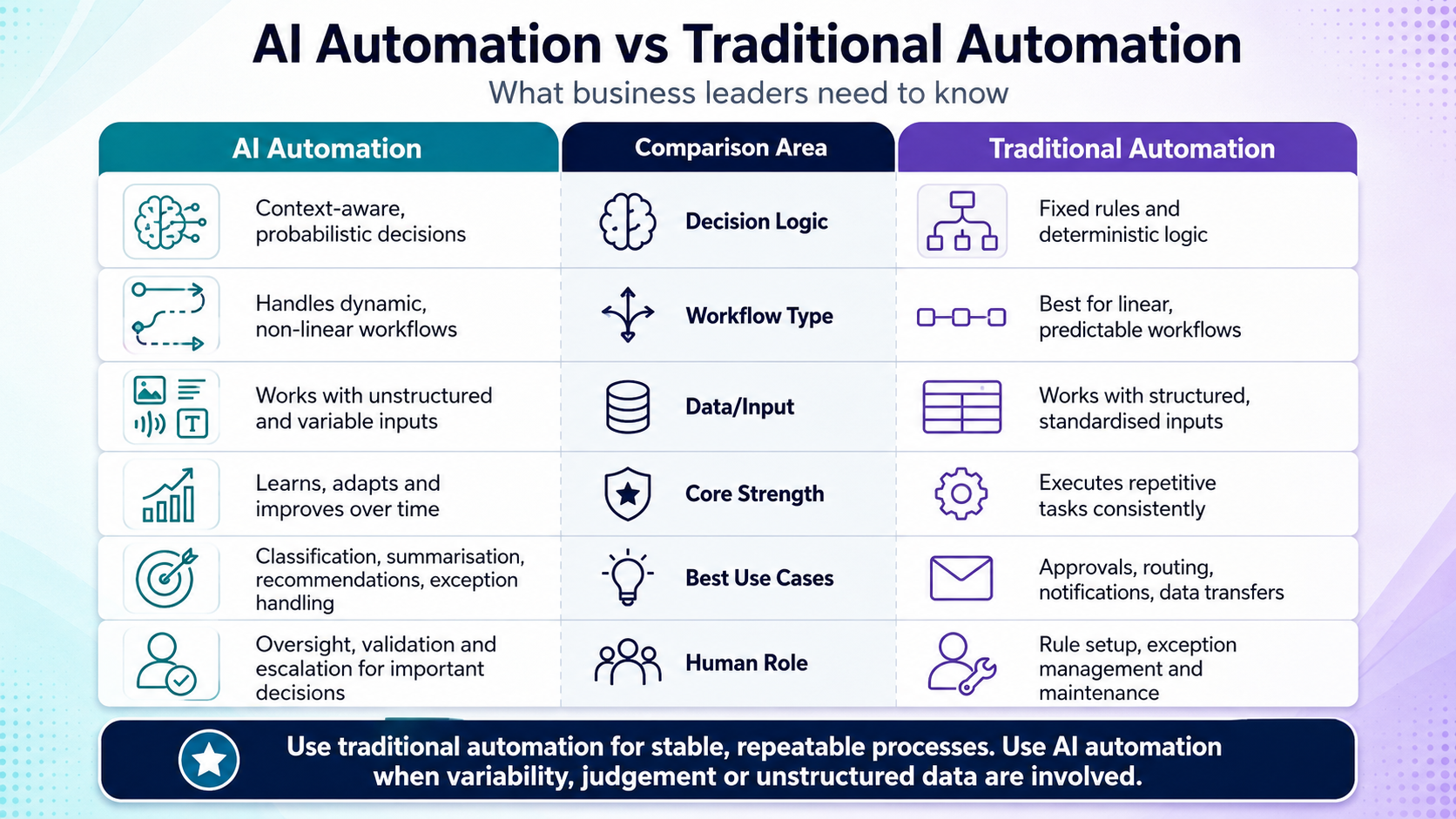
Many businesses have already invested in automation. They may use automated email sequences, workflow rules, finance approvals, CRM triggers, reporting dashboards, help desk routing or integration tools that move data between systems.
These systems can be valuable. They reduce repetitive work, improve consistency and help teams operate at scale.
But traditional automation has an important limitation: it usually follows fixed rules.
That works well when the process is predictable. It works less well when the workflow involves messy information, judgement, interpretation, exceptions, written communication, classification, summarisation or decisions that depend on context.
That is where AI automation changes the conversation.
AI automation does not simply move data from one field to another. It can read, classify, summarise, interpret, draft, compare, recommend, triage and orchestrate work across systems. Used properly, it can help businesses automate more complex workflows that were previously too variable for traditional automation.
Used poorly, it can create risk, confusion and unreliable outputs.
For business leaders, the key question is not whether AI automation is “better” than traditional automation. The better question is: which type of automation is right for which workflow?
This article explains the difference between traditional automation and AI automation, where each works best, where AI should not be used, how human approvals should be designed, and how to build a practical business case.
Table of contents
- What is traditional automation?
- What traditional automation does well
- What is AI automation?
- What AI automation adds
- AI automation vs traditional automation: the practical difference
- Where AI should not be used
- Best workflows for AI automation
- Human-in-the-loop approvals
- ROI examples for AI automation
- How to choose the right automation approach
- Implementation pathway for AI automation
- Security, governance and auditability
- How Greenhat can help
- Conclusion
- FAQs
What is traditional automation?
Traditional automation is the use of predefined rules, triggers and workflows to complete tasks without manual intervention.
In simple terms, traditional automation follows logic such as:
- If this happens, then do that.
- If a field equals X, route it to Y.
- If an invoice is below a certain amount, approve it.
- If a customer submits a form, create a CRM record.
- If a ticket is marked urgent, notify a manager.
- If payment is received, send a confirmation email.
Traditional automation is often implemented through workflow tools, CRM automation, ERP configuration, robotic process automation, scripts, APIs, integration platforms, finance systems, ticketing systems and custom software.
It is highly useful when a process is structured and predictable.
For example, a business may automate the process of sending a welcome email when a new customer account is created. The system does not need to interpret the customer’s intent or make a judgement. It simply responds to a known trigger.
That is traditional automation at its best: fast, reliable, repeatable and rule-based.
What traditional automation does well
Traditional automation remains extremely valuable. AI automation does not replace it. In many cases, the strongest enterprise systems combine both.
Traditional automation is particularly effective when the workflow has clear rules, stable inputs and predictable outputs.
1. Repetitive task execution
Traditional automation works well for repetitive administrative steps such as:
- Creating records
- Sending notifications
- Updating statuses
- Assigning tasks
- Copying data between systems
- Generating standard reports
- Moving files
- Triggering reminders
- Applying approval thresholds
These tasks do not require interpretation. They require consistency.
2. Rules-based approvals
Many business approvals follow defined criteria. For example:
- Expenses under $500 may be approved automatically.
- Leave requests may be routed to the employee’s direct manager.
- Sales discounts over 15% may require CFO approval.
- Support tickets with a severity level of “critical” may trigger escalation.
Where the decision logic is known, traditional automation is often the most efficient and auditable option.
3. System-to-system integration
Traditional automation is excellent for connecting systems through APIs. For example:
- A website form creates a CRM lead.
- A CRM opportunity creates a project in a project management system.
- A payment platform updates the finance system.
- An LMS completion record updates a reporting dashboard.
- A help desk ticket creates an internal engineering task.
These workflows do not necessarily need AI. They need reliable integration architecture.
4. Standard reporting and alerts
Traditional automation can generate scheduled reports, send alerts, update dashboards and notify staff when thresholds are crossed. For example:
- Weekly sales reports
- Inventory reorder alerts
- Failed payment notifications
- Compliance deadline reminders
- SLA breach alerts
- Monthly utilisation dashboards
If the data is structured and the reporting logic is defined, traditional automation may be sufficient.
5. High-volume transactional workflows
Traditional automation is often ideal for high-volume, low-variation workflows. Examples include:
- Order confirmations
- Appointment reminders
- Password reset emails
- Standard onboarding sequences
- Recurring invoice reminders
- Basic ticket routing
- Form submission workflows
These automations can deliver significant efficiency gains without needing AI.
What is AI automation?
AI automation is the use of artificial intelligence to automate tasks that require interpretation, classification, summarisation, generation, prediction or decision-support.
Unlike traditional automation, AI automation can work with less structured information. It can process text, documents, emails, transcripts, support tickets, policies, images, records, reports and business data.
AI automation may involve:
- Reading and summarising documents
- Classifying customer enquiries
- Extracting key information from emails
- Drafting responses
- Comparing records against policies
- Identifying anomalies
- Recommending next steps
- Routing work based on context
- Generating reports from raw information
- Coordinating tasks across multiple systems
- Supporting human decision-making
AI automation is especially powerful when paired with workflow design, APIs, secure cloud infrastructure, access controls and human-in-the-loop approvals.
A useful way to think about it is this:
Traditional automation executes known rules. AI automation helps handle variable information and judgement-heavy workflows.
What AI automation adds
AI automation adds capabilities that traditional automation typically cannot provide on its own.
1. Classification
AI can classify information that does not arrive in a neat format.
For example, a customer service inbox may receive emails about refunds, complaints, technical issues, billing questions, product faults and general enquiries.
Traditional automation may struggle unless the customer uses a specific form or selects the right category.
AI automation can read the message and classify it based on meaning.
A customer writes:
“I paid for this last week but still can’t access my account. I’ve emailed twice and no one has replied.”
An AI-enabled workflow may classify this as:
- Billing issue
- Access issue
- Customer frustration
- Potential escalation
- Requires urgent response
The system can then route the ticket appropriately.
2. Summarisation
AI can summarise long or messy information into useful business outputs. Examples include:
- Summarising customer complaints
- Summarising sales call transcripts
- Summarising legal or compliance documents
- Summarising support ticket history
- Summarising project status updates
- Summarising board papers or operational reports
This is particularly valuable for managers and executives who need clear information without manually reading every underlying record.
3. Information extraction
AI automation can extract key details from documents, emails or notes. For example:
- Invoice number
- Supplier name
- Contract renewal date
- Customer issue
- Required action
- Risk rating
- Assessment result
- Policy breach
- Missing documentation
- Key obligation
Traditional automation usually requires structured data. AI can help convert unstructured information into structured workflow data.
4. Drafting and generation
AI can draft useful content for human review. Examples include:
- Customer response drafts
- Internal briefing notes
- Policy summaries
- Sales proposal sections
- Compliance evidence summaries
- Meeting follow-up emails
- Support knowledge base articles
- Training material drafts
- Report commentary
The important point is that AI should not always send or publish this content automatically. In many enterprise contexts, the AI should prepare the draft and a human should approve it.
5. Decision-support
AI automation can support decisions by analysing available information and recommending next actions. For example:
- Which support tickets should be escalated?
- Which invoices appear inconsistent with policy?
- Which students or customers may need intervention?
- Which sales leads look highest priority?
- Which contracts may require review?
- Which operational tasks are blocked?
- Which compliance items are missing evidence?
This does not mean AI should make every decision. In many cases, AI should support human judgement by surfacing patterns, risks and recommendations.
6. Workflow orchestration
Advanced AI automation can coordinate multi-step workflows across systems. For example, an AI-enabled operations workflow might:
- Read incoming job requests.
- Classify the request type.
- Check customer status in the CRM.
- Review prior project notes.
- Identify missing information.
- Draft a response asking for clarification.
- Create a task for the right team.
- Notify the manager if risk is detected.
- Update the dashboard.
This is where AI automation begins to overlap with intelligent agents and agentic workflows.
The value is not just that AI completes one task. The value is that AI can help move work through a business process.
AI automation vs traditional automation: the practical difference
The table below summarises the practical differences.
| Area | Traditional automation | AI automation |
|---|---|---|
| Core function | Executes predefined rules | Interprets information and supports decisions |
| Best for | Structured, repeatable workflows | Variable, text-heavy or judgement-heavy workflows |
| Inputs | Forms, fields, databases, defined triggers | Emails, documents, notes, transcripts, records, mixed data |
| Logic | If-this-then-that rules | Classification, summarisation, generation, prediction, reasoning |
| Flexibility | Low to moderate | Higher, but requires governance |
| Reliability | Very high when rules are clear | Strong when designed and tested properly, but needs validation |
| Risk profile | Lower if rules are correct | Higher if outputs are not reviewed or monitored |
| Human oversight | Often not required for simple workflows | Often required for approvals, exceptions and sensitive outputs |
| Example | Send invoice reminder after 14 days | Review invoice context and flag unusual charges |
| Best implementation | Workflow tools, APIs, scripts, RPA, system configuration | AI models, workflow orchestration, APIs, permissions, audit logs, human review |
The strongest automation strategies do not treat this as a competition.
They use traditional automation where rules are clear and AI automation where interpretation is needed.
Where AI should not be used
AI automation is powerful, but it should not be applied indiscriminately.
Business leaders should be cautious about using AI in workflows where errors could create legal, financial, safety, privacy or reputational risk.
1. Final decisions without review in high-risk workflows
AI should generally not make final decisions without human review in areas such as:
- Legal decisions
- Medical decisions
- Employment termination
- Credit approval
- Regulatory compliance determinations
- High-value financial approvals
- Sensitive customer disputes
- Safety-critical operations
AI may assist with analysis, summarisation or evidence preparation, but final decisions should remain with appropriately authorised people.
2. Workflows with poor data access or unclear authority
AI automation should not be deployed where the system cannot access reliable information or where authority boundaries are unclear.
For example, if an AI agent can access customer records but not contract terms, it may generate incomplete recommendations. If it has permission to update records without proper controls, it may introduce operational risk.
Before implementation, the business should define:
- What data the AI can access
- What actions it can take
- What actions require approval
- What systems it can update
- What information it must never access
- What logs must be retained
3. Processes that are broken at the workflow level
AI should not be used to disguise a poorly designed process.
If a workflow has unclear ownership, inconsistent inputs, no defined approval pathway and no agreed success metric, AI automation may simply accelerate confusion.
Process design should come before implementation.
4. Tasks requiring guaranteed factual accuracy without validation
AI-generated outputs can be useful, but they should be validated where accuracy matters. Examples include:
- Regulatory advice
- Contract interpretation
- Financial reporting
- Clinical information
- Technical specifications
- Compliance submissions
- Public statements
AI automation can help prepare drafts, summaries and checks, but the business should design review points before outputs are relied upon.
5. Automating sensitive communication without guardrails
AI-generated customer or employee communication should be carefully controlled.
For example, automatically sending AI-written responses to complaints, HR issues or legal disputes may create risk.
A safer approach is to use AI to prepare a draft, summarise the context and recommend a response category, then require human approval before sending.
Best workflows for AI automation
AI automation is most valuable where work is repetitive but not purely rules-based.
The best opportunities often involve high-volume information processing, manual triage, document-heavy workflows, internal coordination and decision-support.
Finance workflows
AI automation can support finance teams by reducing manual review effort and improving exception handling. Examples include:
- Invoice classification
- Accounts payable exception handling
- Expense policy review
- Supplier enquiry triage
- Revenue reconciliation support
- Monthly close commentary
- Cashflow variance explanations
A traditional automation may route invoices based on amount. AI automation can read invoice descriptions, compare them with purchase orders, identify unusual charges and draft questions for the supplier or internal approver.
Operations workflows
Operations teams often manage work across multiple people, systems and exceptions. AI automation can assist with:
- Job intake triage
- Supplier coordination
- Task prioritisation
- Resource allocation support
- Exception alerts
- Status update summaries
- Internal handover notes
- Operational risk reporting
For example, an AI-enabled workflow could review incoming job requests, identify missing information, classify urgency, create tasks and prepare a manager summary.
Customer service workflows
Customer service is one of the clearest areas for AI automation, provided the system is governed properly. Use cases include:
- Ticket classification
- Complaint summarisation
- Escalation detection
- Knowledge base draft responses
- Customer sentiment reporting
- Repeated issue identification
- Support trend analysis
- Agent assist tools
Traditional automation can route tickets based on selected categories. AI automation can interpret what the customer actually wrote.
Sales and revenue operations
Sales teams often lose time to CRM administration, proposal drafting and pipeline reporting. AI automation can assist with:
- Lead triage
- CRM hygiene
- Sales call summaries
- Proposal drafting
- Deal desk approval support
- Follow-up email drafts
- Pipeline risk analysis
- Customer handover summaries
For example, after a sales call, AI automation could summarise the transcript, update CRM notes, identify next steps, draft a follow-up email and flag whether technical scoping is required.
HR and people operations
HR workflows are often document-heavy and sensitive, making human oversight especially important. AI automation can support:
- Employee onboarding workflows
- Policy Q&A
- Training allocation
- Internal HR help desk triage
- Performance review preparation
- Exit interview summarisation
- Compliance documentation checks
AI should usually support HR staff rather than make final employment decisions.
Compliance and risk workflows
Compliance teams often spend significant time gathering evidence, reviewing documents and preparing reports. AI automation can assist with:
- Evidence collection
- Policy monitoring
- Audit preparation
- Regulatory deadline tracking
- Risk exception reporting
- Document completeness checks
- Control testing support
- Board reporting summaries
For regulated industries, audit trails, access controls and human approval points are essential.
Education and training provider workflows
For education providers and training organisations, AI automation may help with:
- Student support triage
- Learner progress monitoring
- Assessment review support
- Compliance evidence collection
- Training resource quality review
- Course improvement workflows
- Academic risk reporting
- Staff task allocation
For example, AI automation could identify students at risk, summarise the reasons, recommend support actions and route cases to the appropriate staff member for review.
Human-in-the-loop approvals
Human-in-the-loop AI means that people remain involved in reviewing, approving or handling parts of an AI-enabled workflow.
This is one of the most important concepts in enterprise AI automation.
The goal is not to remove people from every process. The goal is to use AI to reduce manual workload while keeping human judgement where it matters.
Where humans should remain involved
Human approval is especially important when the workflow involves:
- Financial approvals
- Customer complaints
- Legal or compliance issues
- HR matters
- Sensitive data
- Unusual exceptions
- Low-confidence AI outputs
- External communication
- Material business decisions
For example, an AI system may draft a supplier dispute email, but a finance manager should approve it before it is sent.
Confidence thresholds
AI automation can be designed with confidence thresholds. For example:
- If confidence is high and risk is low, the system may proceed automatically.
- If confidence is moderate, the system may request human review.
- If confidence is low, the system may escalate or ask for more information.
This allows businesses to automate safely without pretending that every AI output is equally reliable.
Approval records and audit trails
Every meaningful AI workflow should record:
- What information was used
- What the AI produced
- Whether a human reviewed it
- Who approved it
- What changes were made
- When the action occurred
- What system was updated
- Whether an exception occurred
This is critical for enterprise governance.
ROI examples for AI automation
The ROI of AI automation usually comes from a combination of time savings, faster throughput, fewer errors, reduced rework, better reporting and increased staff capacity.
It should not be assessed only as a headcount reduction exercise.
Example 1: Customer service triage
A mid-sized business receives 1,000 support tickets per month.
Staff manually review, categorise and route each ticket. If each triage step takes three minutes, that is approximately 50 hours per month spent on initial sorting.
An AI automation workflow could classify tickets, detect urgency, summarise the issue and route the ticket to the right team.
If it reduces manual triage time by 60%, the business may recover around 30 hours per month. More importantly, urgent issues may be escalated faster, customers may receive more consistent responses and managers may gain better visibility into recurring problems.
Example 2: Finance exception handling
A finance team processes hundreds of supplier invoices each month.
Traditional automation may approve invoices below a certain threshold. However, exceptions still require manual review.
AI automation could extract invoice details, compare them against purchase orders, flag anomalies, summarise the issue and prepare an approval note.
The ROI may come from:
- Faster invoice processing
- Fewer missed discrepancies
- Reduced back-and-forth
- Better supplier communication
- Cleaner audit records
Example 3: Sales proposal support
A sales team spends significant time preparing proposal drafts.
AI automation could pull CRM data, review discovery notes, identify relevant service lines, draft proposal sections and create internal scoping tasks.
Human sales and technical staff would still review the final proposal.
The ROI may include:
- Faster proposal turnaround
- More consistent quality
- Better use of senior staff time
- Improved sales follow-up
- Reduced administrative load
Example 4: Compliance evidence collection
A regulated organisation needs to prepare evidence for audits.
Staff manually search folders, systems, spreadsheets and email threads to gather documentation.
AI automation could help identify missing evidence, summarise available records, prepare checklists and route requests to responsible staff.
The ROI may include:
- Reduced audit preparation time
- Better evidence completeness
- Lower compliance risk
- Improved executive visibility
- Clearer accountability
How to choose the right automation approach
The right approach depends on the workflow.
Business leaders should avoid starting with the technology. Start with the work.
Use traditional automation when:
- The process is predictable.
- Rules are clear.
- Inputs are structured.
- Outputs are standard.
- Exceptions are rare.
- Accuracy must be deterministic.
- The workflow is already well-defined.
Examples:
- Sending reminders
- Updating statuses
- Routing based on fixed fields
- Generating standard reports
- Creating records from forms
- Applying approval thresholds
Use AI automation when:
- Inputs are unstructured.
- The workflow involves interpretation.
- Staff need to classify, summarise or draft.
- Decisions depend on context.
- There are many exceptions.
- Human review is still required.
- The work is repetitive but variable.
Examples:
- Reading customer emails
- Summarising documents
- Classifying support tickets
- Drafting internal reports
- Reviewing policy compliance
- Extracting obligations from contracts
- Recommending next actions
Use both when:
Many valuable workflows need both traditional automation and AI automation.
For example, a customer complaint workflow may use AI to classify and summarise the complaint, then traditional automation to create a task, notify the manager, update the CRM and schedule a follow-up.
The AI interprets. The automation executes.
That combination is often where the strongest business value is created.
Implementation pathway for AI automation
A sensible AI automation project should be designed carefully. The following framework is a practical starting point.
1. Identify the workflow or operational problem
Start with the business problem. Ask:
- What process is slow?
- What work is repetitive?
- Where do staff spend time manually reviewing information?
- Where do errors occur?
- Where are customers waiting?
- Where is reporting weak?
- Where are managers lacking visibility?
- Where are skilled staff doing low-value administration?
Good AI automation opportunities usually appear where there is friction, volume and measurable cost.
2. Map the current process
Before building, map the workflow. Include:
- People involved
- Systems used
- Data inputs
- Decisions made
- Approval points
- Exceptions
- Outputs
- Reporting requirements
- Security requirements
- Known pain points
This step prevents businesses from automating a process they do not properly understand.
3. Assess AI suitability
Not every workflow needs AI. Assess whether the process requires:
- Rules
- Classification
- Summarisation
- Generation
- Prediction
- Document review
- Data extraction
- Human approval
- System integration
- Workflow orchestration
This determines whether the solution should be traditional automation, AI automation or a combination.
4. Design the future-state workflow
Define exactly what the AI should and should not do. For example:
- AI reads the customer email.
- AI classifies the issue.
- AI summarises the complaint.
- AI recommends priority.
- AI drafts a response.
- Human approves the response.
- System sends the response.
- CRM is updated.
- Dashboard records the outcome.
The design should include exception handling, approval thresholds and fallback pathways.
5. Integrate with existing systems
AI automation becomes much more valuable when it connects with existing systems. These may include:
- CRM
- ERP
- Finance software
- LMS
- Help desk
- Project management tools
- Databases
- Email systems
- Document repositories
- Dashboards
- Cloud platforms
- Internal applications
APIs and integrations are often central to enterprise AI implementation.
6. Build a small, testable first version
Avoid trying to automate an entire department at once. Start with one high-value workflow.
A strong first AI automation project should be:
- Narrow enough to control
- Valuable enough to matter
- Measurable
- Repeatable
- Low to moderate risk
- Easy to review
- Connected to a real operational bottleneck
This allows the business to test reliability, user adoption and ROI before scaling.
7. Add governance, logging and audit trails
Enterprise AI automation should include governance from the start. Important controls include:
- Role-based access
- Approval workflows
- Audit logs
- Output review
- Exception handling
- Data access limits
- Monitoring
- Security controls
- Human override
- Version control
This is especially important in regulated or operationally complex businesses.
8. Measure ROI
Measure outcomes before and after implementation. Useful metrics include:
- Time saved
- Turnaround time
- Error reduction
- Rework reduction
- Tickets resolved faster
- Fewer manual touchpoints
- Higher staff capacity
- Improved customer satisfaction
- Reduced compliance gaps
- Better reporting visibility
The strongest business case will usually include both quantitative and qualitative benefits.
9. Scale responsibly
Once the first workflow is proven, expand to adjacent workflows. For example:
- Ticket triage may lead to knowledge base automation.
- Invoice review may lead to supplier communication automation.
- Sales call summaries may lead to proposal automation.
- Compliance evidence collection may lead to audit dashboarding.
AI automation should mature through controlled expansion, not uncontrolled experimentation.
Security, governance and auditability
AI automation introduces new governance requirements. These should not be treated as afterthoughts.
Data privacy
AI systems may process customer data, employee information, financial records, contracts, operational reports or commercially sensitive material. Businesses should be clear about:
- What data is used
- Where data is processed
- Whether data is retained
- Who can access outputs
- Whether sensitive information is masked
- Whether the use case complies with internal policies and external obligations
Access controls
AI automation should follow the same principle as enterprise software: users and systems should only access what they need.
Role-based permissions are essential.
For example, an AI assistant used by customer service staff should not necessarily access payroll data, board reports or confidential HR records.
API security
Many AI automation projects rely on APIs to connect systems. API security should include:
- Authentication
- Authorisation
- Rate limits
- Logging
- Secure credential management
- Error handling
- Monitoring
- Data validation
Poor integrations can create operational and security risk.
Audit logs
Audit trails are vital for trust.
A well-designed AI automation system should record what happened, when, why and by whom.
This is particularly important when AI outputs influence decisions, customer communication, compliance processes or financial workflows.
Model output validation
AI outputs should be validated according to risk.
Low-risk internal summaries may require lighter review. High-risk recommendations or external communications may require formal approval. Validation can include:
- Human review
- Confidence thresholds
- Source referencing
- Structured output checks
- Policy rules
- Exception flags
- Sampling and quality review
Change management
AI automation changes how work gets done. Staff need to understand:
- What the system does
- What it does not do
- When to trust it
- When to review it
- How to override it
- How to report problems
- How performance will be measured
Adoption is not just a technical issue. It is an operational and cultural issue.
How Greenhat can help
Greenhat helps established businesses design, build and implement practical AI automation, intelligent agents, workflow systems, API integrations and cloud-based digital platforms.
Our strength is combining strategy, software development, integrations, cloud infrastructure and business process understanding to create systems that work in the real world.
For businesses considering AI automation, Greenhat can assist with:
- AI opportunity audits
- Workflow mapping and process redesign
- AI automation strategy
- Intelligent agent development
- Custom software development
- API and system integrations
- AWS cloud architecture
- Secure application development
- Dashboards and business intelligence
- Human-in-the-loop workflow design
- Governance, logging and audit trail design
- Ongoing support and optimisation
The right AI automation project is not simply about adding an AI tool to the business. It is about designing a better workflow, connecting the right systems, managing risk and measuring commercial value.
Conclusion
Traditional automation and AI automation both have an important role in modern business systems.
Traditional automation is excellent for structured, predictable and rules-based workflows. It is reliable, efficient and often the right choice for simple process automation.
AI automation adds value when work involves interpretation, classification, summarisation, drafting, decision-support and workflow orchestration across variable information.
The best enterprise approach is usually not one or the other. It is a carefully designed combination.
For business leaders, the practical starting point is to identify the workflows where staff spend time manually reviewing, interpreting, routing or summarising information. These are often the areas where AI automation can create measurable operational value.
Success depends on more than the AI model. It requires workflow design, secure integrations, data access, governance, human approvals, audit trails and a clear ROI framework.
If your organisation is exploring where AI automation could create meaningful value, Greenhat can help identify high-value workflows, assess integration requirements and design a practical implementation pathway.
FAQs
What is AI automation?
AI automation uses artificial intelligence to automate or support tasks that require interpretation, classification, summarisation, generation, prediction or decision-support. Unlike traditional automation, which follows fixed rules, AI automation can work with less structured information such as emails, documents, support tickets, notes, transcripts and reports. In business, AI automation is often used to triage requests, summarise information, extract key data, draft responses, recommend actions and orchestrate workflows across systems.
How is AI automation different from traditional automation?
Traditional automation follows predefined rules. For example, if a form is submitted, the system creates a CRM record. AI automation can interpret information and support more complex workflows. For example, it can read a customer email, identify the issue, detect urgency, summarise the problem, recommend a response and route the task to the right team. Traditional automation is best for predictable workflows. AI automation is best for variable, text-heavy or judgement-heavy workflows.
Does AI automation replace traditional automation?
No. In many enterprise environments, AI automation works best when combined with traditional automation. AI can interpret, classify or generate information, while traditional automation executes defined actions such as updating systems, sending notifications, creating tasks or applying approval rules. The strongest workflow designs often use AI for judgement-support and traditional automation for reliable execution.
What business processes are best suited to AI automation?
The best workflows for AI automation are repetitive but variable. Examples include customer service triage, invoice exception review, sales call summarisation, proposal drafting, compliance evidence collection, HR help desk triage, document review, internal reporting and operational task routing. These workflows often involve unstructured information, manual review, repeated decisions and high administrative effort.
Where should AI automation not be used?
AI automation should be used carefully in high-risk workflows. It should generally not make final decisions without human review in legal, medical, financial, HR, compliance or safety-critical contexts. AI should also not be used where data access is poor, authority boundaries are unclear or the underlying process is badly designed. In these cases, AI may support analysis or drafting, but human oversight is essential.
What is human-in-the-loop AI automation?
Human-in-the-loop AI automation means that people remain involved in reviewing, approving or handling parts of an AI-enabled workflow. For example, AI may summarise a complaint and draft a response, but a manager approves the message before it is sent. This approach allows businesses to gain efficiency while maintaining control over sensitive decisions, customer communication, compliance issues and high-risk outputs.
What is the ROI of AI automation?
The ROI of AI automation may come from reduced manual hours, faster turnaround times, fewer errors, reduced rework, better reporting, improved customer experience and increased staff capacity. For example, if a workflow consumes 40 staff hours per week and AI automation reduces manual effort by 50%, the business may recover around 20 hours per week for higher-value work. The broader ROI may include better service quality, faster decisions and improved operational visibility.
Do we need clean data before implementing AI automation?
You do not need perfect data, but you do need reliable access to the right information. AI automation performs better when systems, documents and workflows are organised. Before implementation, businesses should identify relevant data sources, assess quality, define access permissions and clarify how outputs will be validated. In some cases, the first step is improving data structure, integrations or reporting before introducing AI automation.
Can AI automation work with our existing systems?
Yes, AI automation can often work with existing business systems through APIs, databases, workflow tools and secure integrations. These systems may include CRMs, ERPs, finance platforms, help desks, LMSs, project management tools, document repositories and dashboards. The implementation challenge is not only the AI model. It is designing how the AI accesses information, triggers actions, records outputs and fits into the existing workflow.
Should we start with one workflow or a whole department?
Most businesses should start with one high-value workflow. The first workflow should be narrow enough to control, valuable enough to matter and measurable enough to assess ROI. Once reliability, governance and adoption are proven, the business can expand AI automation to adjacent workflows. This reduces risk and helps the organisation build capability progressively.
Is AI automation secure?
AI automation can be secure if it is designed properly. Important controls include role-based access, data privacy rules, secure API integrations, audit logs, human approvals, monitoring, output validation and clear limits on what the AI can access or do. Security should be built into the workflow from the start, especially where sensitive customer, employee, financial or compliance information is involved.
How does Greenhat help with AI automation?
Greenhat helps businesses identify, design, build and implement practical AI automation solutions. This includes AI opportunity audits, workflow mapping, custom AI systems, intelligent agents, API integrations, AWS cloud infrastructure, dashboards, governance design and ongoing technical support. Greenhat focuses on real operational value: improving workflows, reducing manual workload, connecting systems and helping businesses implement AI safely and commercially.