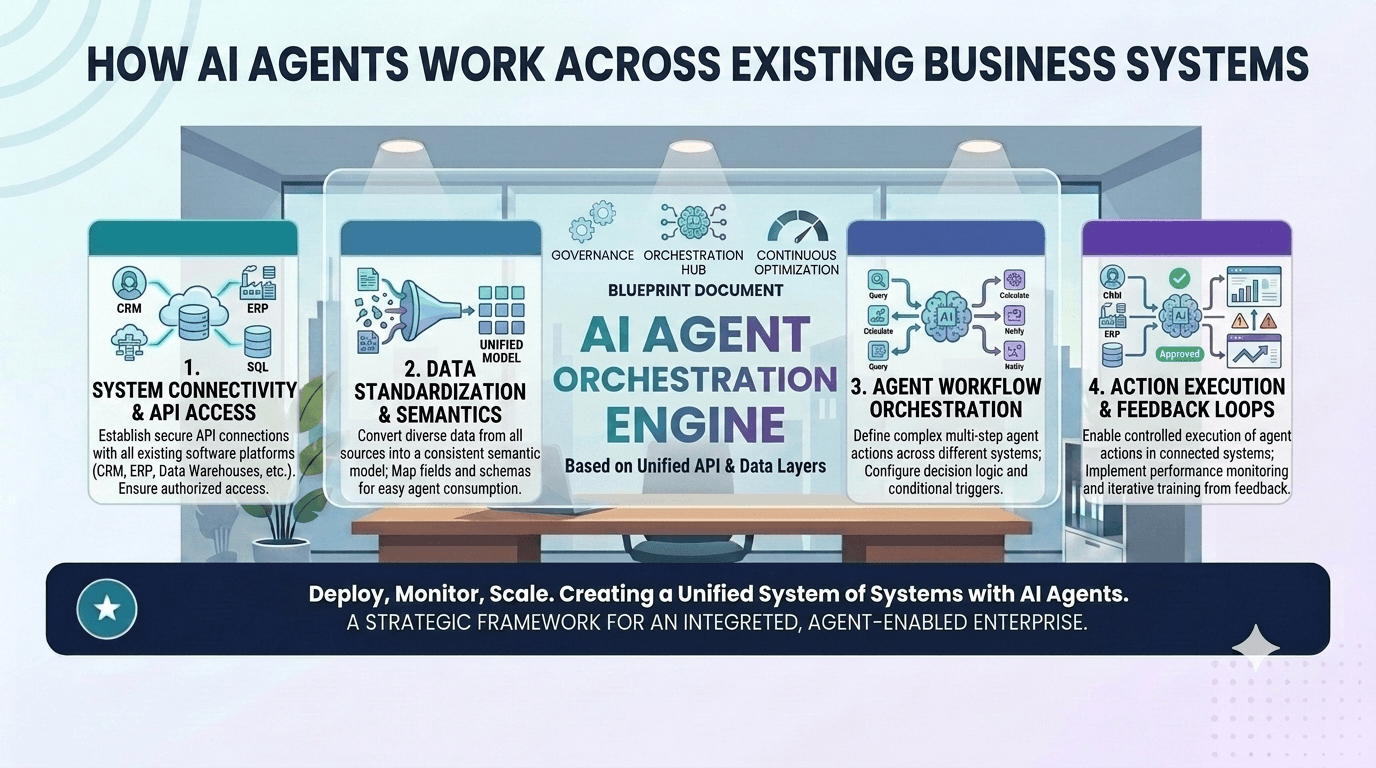
For most established organisations, the problem is not a lack of software. It is the opposite. Customer data may live in a CRM. Financial records may sit in accounting or ERP software. Staff activity may be managed in inboxes, spreadsheets, help desks, project management tools, learning platforms, databases and dashboards. Each system may work reasonably well on its own, but the business still depends on people manually moving information between them.
That is where AI integration matters.
An AI agent that only answers questions in isolation may be useful. An AI agent that can securely read from, write to, summarise, classify, route, update and report across business systems can support real operational work.
For mid-sized and larger businesses, the value of AI is rarely created by the model alone. The value comes from how well the AI agent is connected to workflows, data sources, permissions, approvals and business rules.
This article explains how AI agents can work across existing business systems, why integration design is central to enterprise AI success, and how organisations can identify the right systems and workflows to connect first.
Table of Contents
- What is AI integration?
- Why disconnected systems limit AI value
- What AI agents need access to
- How AI agents connect to business systems
- Examples of AI integration across core systems
- APIs, databases, webhooks and middleware
- Role-based permissions and data boundaries
- What should you integrate first?
- Why integration design matters more than the AI model
- Implementation pathway for enterprise AI integration
- ROI of AI integration
- Security, governance and auditability
- How Greenhat can help
- FAQs
What is AI integration?
AI integration is the process of connecting AI agents, AI automation or intelligent workflows with the systems, data and tools a business already uses.
In simple terms, AI integration allows an AI agent to do useful work inside your existing operating environment.
Instead of asking a standalone chatbot a general question, a properly integrated AI agent might:
- Read customer records from a CRM.
- Check invoice data in a finance system.
- Summarise support tickets from a help desk.
- Identify overdue tasks in a project management platform.
- Analyse student progress in an LMS.
- Draft a response from an inbox.
- Update a dashboard with workflow status.
- Create a task for a human team member to review.
- Escalate an exception based on business rules.
The difference is practical.
A disconnected AI tool may generate text. An integrated AI agent can participate in a workflow.
That does not mean the AI agent should have unrestricted access to every system. In enterprise environments, good AI integration requires careful design around permissions, data boundaries, human approvals, audit logs, security and change management.
Why disconnected systems limit AI value
Many businesses already have the data they need to make better decisions and automate more work. The issue is that the data is often scattered across systems.
A sales team may use a CRM. The finance team may use Xero, MYOB, NetSuite, Dynamics or another ERP/accounting platform. Operations may rely on spreadsheets, project boards and internal databases. Customer service may use a help desk. HR may use separate onboarding and payroll tools. Education providers may have an LMS, student management system, assessment system and compliance evidence repository.
Each system may be useful, but disconnected systems create operational friction.
Common problems include:
- Staff manually copying data between platforms.
- Managers waiting for reports from multiple departments.
- Customer information being inconsistent across systems.
- Finance teams reconciling data manually.
- Support teams lacking visibility into sales, billing or fulfilment.
- Operations teams working from outdated spreadsheets.
- Compliance teams chasing evidence across emails and folders.
- Executives lacking a reliable real-time view of business performance.
AI does not automatically solve this.
In fact, if an AI agent is not integrated properly, it may simply become another disconnected tool. It may answer generic questions but fail to improve the way work actually moves through the business.
For enterprise AI to create meaningful value, it must be connected to the systems where work happens.
What AI agents need access to
AI agents need access to the right information, at the right time, with the right permissions.
That access may include:
1. Business data
This might include customer records, invoices, contracts, enrolments, tickets, product data, workflow status, inventory levels, employee records, documents or operational reports.
The AI agent does not necessarily need access to everything. It needs access to the specific data required for the workflow it is supporting.
2. Business rules
AI agents need to understand how decisions should be made.
For example:
- Which invoices require approval?
- Which customer complaints need escalation?
- Which leads should be prioritised?
- Which assessment submissions require review?
- Which support tickets breach service-level expectations?
- Which staff members are authorised to approve a workflow?
Some rules may be deterministic. Others may require classification, summarisation or human review.
3. Workflow context
AI agents need to know where a task sits in the business process.
For example:
- Is this a new enquiry or an existing customer?
- Has the invoice already been approved?
- Has the student already received support?
- Has the customer already complained twice?
- Is this task waiting on finance, operations, legal or management?
- Has the issue already been escalated?
Without workflow context, AI agents can produce outputs that sound useful but do not fit the operational reality.
4. Communication channels
Many workflows depend on email, Microsoft Teams, Slack, portals, notifications or help desks.
AI integration may allow an agent to:
- Monitor an inbox.
- Summarise long email threads.
- Create draft responses.
- Notify the correct staff member.
- Add notes to a CRM.
- Update a ticket.
- Trigger an approval request.
- Send a customer-facing message after human approval.
5. Human approval points
Enterprise AI should not be designed as an uncontrolled automation layer.
For many workflows, the best design is human-in-the-loop AI, where the agent prepares, recommends, classifies or drafts, but a person reviews and approves important actions.
This is particularly important for finance, HR, legal, compliance, healthcare, education and customer-facing decisions.
How AI agents connect to business systems
AI agents can connect to business systems in several ways. The right approach depends on the systems involved, the workflow requirements, security constraints and the quality of available data.
| Integration method | How it works | Best used for |
|---|---|---|
| API integration | Connects systems through approved software interfaces | CRM updates, finance workflows, LMS records, support tickets |
| Database integration | Reads or writes directly to structured databases | Reporting, dashboards, internal platforms, custom applications |
| Webhooks | Triggers an action when an event occurs | New lead, new ticket, invoice status change, enrolment update |
| Middleware | Uses an integration layer to connect multiple tools | Multi-system workflows, transformation logic, orchestration |
| File-based integration | Uses CSV, Excel, XML or document exchange | Legacy systems, scheduled imports, finance or compliance exports |
| RPA-style automation | Interacts with systems through user interfaces | Older systems without APIs, temporary automation, admin tasks |
| Data warehouse integration | Centralises data for analytics and reporting | Executive dashboards, BI, cross-system reporting, AI insights |
For modern enterprise AI integration, APIs, databases, webhooks and cloud-based middleware are usually preferable where available. They are more reliable, auditable and scalable than manual workarounds.
However, many established businesses have a mixed technology environment. A practical AI integration strategy often needs to support both modern cloud systems and older legacy platforms.
Examples of AI integration across core systems
The best way to understand AI integration is to look at the systems already used inside a business.
CRM integration
A CRM holds valuable information about prospects, customers, sales activity, pipeline status and account history.
An AI agent integrated with a CRM could:
- Summarise recent customer interactions before a sales call.
- Identify stale opportunities that need follow-up.
- Classify inbound leads by fit, urgency or value.
- Draft personalised follow-up emails.
- Detect missing CRM fields.
- Prepare account handover summaries.
- Generate pipeline commentary for management reporting.
- Alert sales leaders to risks in major deals.
Scenario: A mid-sized professional services firm receives 80 inbound enquiries per week.
Problem: Sales staff manually review each enquiry, check CRM history, assign priority and draft responses.
AI-enabled solution: An AI agent reads the enquiry, checks CRM records, classifies the lead, suggests next steps and drafts a response for review.
Systems involved: Website forms, CRM, email, calendar, reporting dashboard.
Human oversight: Sales staff approve customer-facing responses and deal qualification.
Business outcome: Faster response times, better lead prioritisation and improved CRM consistency.
ERP and finance system integration
Finance workflows are often highly structured but still manually intensive.
An AI agent integrated with finance or ERP systems could:
- Match supplier invoices against purchase orders.
- Flag invoice exceptions.
- Summarise overdue accounts.
- Draft payment reminder emails.
- Reconcile revenue data across systems.
- Identify unusual expense claims.
- Support month-end reporting.
- Prepare commentary on budget variances.
Scenario: A business processes hundreds of supplier invoices per month.
Problem: Finance staff manually review invoice details, compare them with purchase orders, chase approvals and update status reports.
AI-enabled solution: An AI agent extracts invoice data, checks purchase order records, flags discrepancies and routes exceptions to the correct approver.
Systems involved: Finance system, ERP, document storage, email, approval workflow, dashboard.
Human oversight: Finance staff approve exceptions and final payment decisions.
Business outcome: Less manual checking, faster approvals, fewer missed exceptions and better visibility over liabilities.
LMS and education system integration
Education providers often operate across learning management systems, student management systems, assessment platforms, CRM tools and compliance repositories.
AI integration can support:
- Student support triage.
- Learner progress monitoring.
- Assessment feedback support.
- Compliance evidence collection.
- Training resource quality review.
- Course engagement reporting.
- Risk alerts for disengaged learners.
- Admin support for trainers and student services teams.
Scenario: A training provider wants to identify students at risk of disengagement.
Problem: Relevant data is spread across the LMS, student management system, assessment submissions, attendance records and support emails.
AI-enabled solution: An AI agent monitors learner activity, flags risk patterns, summarises student history and recommends support actions.
Systems involved: LMS, student management system, assessment platform, CRM, email, dashboard.
Human oversight: Student support staff review recommendations and decide interventions.
Business outcome: Earlier support, more consistent case management and better operational visibility.
Help desk and customer support integration
Customer support is one of the clearest areas for AI integration because tickets often include repetitive requests, known escalation paths and large volumes of text.
An AI agent integrated with a help desk could:
- Triage new tickets.
- Summarise customer history.
- Suggest knowledge base responses.
- Detect sentiment or urgency.
- Route tickets to the right team.
- Flag repeat complaints.
- Prepare escalation summaries.
- Identify recurring product or service issues.
Scenario: A business receives 300 support tickets per week across billing, technical support and product questions.
Problem: Tickets are manually categorised, and managers struggle to identify recurring issues until they become larger problems.
AI-enabled solution: An AI agent classifies tickets, suggests responses, flags high-risk complaints and reports recurring themes.
Systems involved: Help desk, CRM, billing system, knowledge base, dashboard.
Human oversight: Support staff approve responses and handle escalations.
Business outcome: Faster triage, better escalation, improved reporting and reduced support load.
Inbox and document workflow integration
Many enterprise workflows still begin in email.
An AI agent can assist by:
- Monitoring shared inboxes.
- Summarising long email threads.
- Extracting key details from attachments.
- Identifying action items.
- Creating tasks.
- Drafting replies.
- Filing documents.
- Updating internal systems.
This is particularly useful where a business receives large volumes of supplier emails, customer requests, forms, documents or approvals.
Dashboard and business intelligence integration
AI agents can also improve reporting and decision support.
An AI agent connected to a dashboard or data warehouse could:
- Answer executive questions using approved business data.
- Explain changes in operational metrics.
- Summarise weekly performance.
- Identify exceptions.
- Generate commentary for board reports.
- Compare results across departments.
- Highlight missing or inconsistent data.
The key is that the AI agent must be connected to reliable, governed data sources. Otherwise, the organisation risks generating confident but unreliable commentary.
APIs, databases, webhooks and middleware
The technical design of AI integration matters because it determines reliability, security, scalability and maintainability.
APIs
APIs allow systems to communicate through approved interfaces.
For example, an AI agent may use APIs to:
- Retrieve a customer record from a CRM.
- Create a support ticket.
- Update invoice status.
- Add a note to a case file.
- Pull enrolment data from an LMS.
- Send a notification to Teams or Slack.
Good API design helps ensure the AI agent only performs authorised actions and that each action can be logged.
Databases
Some businesses use custom applications or internal databases that hold operationally important data.
AI agents may need to query databases to retrieve:
- Order history.
- User records.
- Workflow status.
- Product information.
- Student progress.
- Assessment outcomes.
- Compliance evidence.
- Operational metrics.
Database integration needs careful permission design. The AI agent should generally use controlled queries, scoped access and application-level rules rather than unrestricted database access.
Webhooks
Webhooks allow systems to trigger actions when something happens.
For example:
- A new lead is submitted.
- A support ticket is created.
- An invoice changes status.
- A student fails an assessment.
- A customer cancels a subscription.
- A stock level drops below a threshold.
This enables event-driven AI workflows, where the agent responds to business events rather than waiting for a person to initiate the process.
Middleware and orchestration layers
Middleware can act as the coordination layer between multiple systems.
This is useful when a workflow involves several steps, such as:
- Receive an enquiry.
- Check CRM history.
- Classify the enquiry.
- Create a task.
- Draft a response.
- Notify a staff member.
- Update a dashboard.
- Record the agent’s action in an audit log.
For complex enterprise AI integration, the orchestration layer is often as important as the AI model itself.
Role-based permissions and data boundaries
AI integration must be designed around access control.
A staff member in customer service should not necessarily have access to payroll data. A sales agent should not see confidential HR records. A student support workflow should not expose unrelated financial data. An AI agent should not be able to take actions beyond its role.
Role-based permissions define what the AI agent can access and do.
This may include:
- Which systems the agent can access.
- Which records it can read.
- Which fields it can view.
- Which actions it can perform.
- Which outputs require human approval.
- Which users can override or approve agent recommendations.
- Which activities must be logged.
Data boundaries are especially important in businesses dealing with sensitive information, such as healthcare, education, finance, legal services, HR, government or regulated industries.
An enterprise AI agent should be designed like a staff member with a defined role, not like a general-purpose tool with unlimited access.
What should you integrate first?
The best first AI integration is usually not the most ambitious one.
It is normally a workflow that is:
- Repetitive enough to justify automation.
- Valuable enough to matter commercially.
- Structured enough to be controlled.
- Painful enough that staff want improvement.
- Measurable enough to assess ROI.
- Low-risk enough to test safely.
- Connected to systems with available data or APIs.
Good starting points often include:
1. High-volume admin workflows
Examples include invoice processing, ticket triage, inbox management, CRM updates, reporting preparation and document review.
2. Workflows with clear human approval
These are ideal because the AI agent can prepare work while humans retain control.
Examples include drafted responses, recommended classifications, approval routing and exception summaries.
3. Reporting workflows
AI agents can help pull together information from multiple systems and generate management commentary, provided the underlying data is reliable.
4. Customer service triage
Support workflows often have clear categories, common questions and established escalation rules.
5. Sales operations
CRM hygiene, lead triage, proposal support and account summaries can create visible value without replacing human relationship management.
A sensible starting question is:
Where are skilled staff spending too much time moving, checking, summarising or re-entering information between systems?
That is often where AI integration can create practical value.
Why integration design matters more than the AI model
Many AI projects start with the wrong question: “Which AI model should we use?”
The better question is: “Which workflow should we improve, and what systems does that workflow depend on?”
The AI model is important, but in enterprise environments it is only one part of the solution.
A successful AI agent also needs:
- A defined business problem.
- Reliable data access.
- Integration with existing systems.
- Clear workflow rules.
- Permission controls.
- Human approval points.
- Logging and audit trails.
- Monitoring and exception handling.
- User adoption.
- ROI measurement.
A powerful model connected poorly to the business may produce little value. A well-designed AI workflow using the right integrations can create measurable operational improvement even when the AI component is relatively narrow.
For most established businesses, AI implementation is not simply a model selection exercise. It is a systems, workflow and integration design exercise.
Implementation pathway for enterprise AI integration
A practical AI integration project should move through a structured pathway.
1. Identify the workflow or operational problem
Start with the business issue, not the technology.
Examples:
- Too many manual CRM updates.
- Slow finance approvals.
- Poor visibility across support tickets.
- High administrative workload in student services.
- Inconsistent reporting across systems.
- Staff spending hours summarising documents.
- Managers relying on outdated spreadsheets.
2. Map the current process
Document how the workflow currently operates.
Include:
- Systems used.
- Data sources.
- People involved.
- Decisions made.
- Approvals required.
- Exceptions handled.
- Outputs produced.
- Current pain points.
- Time and cost implications.
This often reveals that the workflow problem is not simply “lack of AI”. It may be a process design, data quality, system integration or governance issue.
3. Assess AI suitability
Not every workflow needs AI.
Some processes are better handled by standard automation, rules, integrations or dashboards.
AI is more useful when the workflow involves:
- Summarisation.
- Classification.
- Natural language inputs.
- Pattern recognition.
- Drafting.
- Decision support.
- Exception detection.
- Multi-step workflow orchestration.
- Unstructured documents or emails.
4. Design the future-state workflow
Define what the AI agent should do and what humans should continue to control.
For example:
- The AI agent classifies invoices; finance approves exceptions.
- The AI agent drafts responses; staff approve before sending.
- The AI agent identifies at-risk students; support staff decide interventions.
- The AI agent summarises CRM activity; sales managers review pipeline actions.
5. Integrate with existing systems
Connect the agent to the required systems using APIs, databases, webhooks, middleware, data warehouses or secure application architecture.
Integration should be designed for reliability, access control and auditability.
6. Build a small, testable first version
Avoid trying to automate an entire department immediately.
Start with a controlled workflow where performance can be measured. Test with real users, real data and clear success criteria.
7. Add governance, logging and audit trails
Track:
- Inputs.
- Data accessed.
- Outputs generated.
- Actions taken.
- Human approvals.
- Exceptions.
- Errors.
- Overrides.
- User feedback.
This is essential for trust, compliance and continuous improvement.
8. Measure ROI
Compare before-and-after metrics, such as:
- Time saved.
- Faster turnaround.
- Fewer errors.
- Reduced rework.
- Better customer response times.
- Improved reporting.
- Reduced manual checking.
- Increased team capacity.
9. Scale responsibly
Once the first workflow is working reliably, extend the AI integration to adjacent workflows.
For example, a customer support triage agent may later connect with billing, CRM and product feedback workflows. A finance approval agent may later support reporting, forecasting and supplier management.
ROI of AI integration
The ROI of AI integration is usually broader than labour savings.
If a workflow consumes 40 staff hours per week and an AI-enabled process reduces that by 50%, the business may recover roughly 20 hours per week for higher-value work. But the commercial value may extend beyond the recovered hours.
AI integration can also improve:
- Turnaround times.
- Data accuracy.
- Customer experience.
- Staff capacity.
- Reporting quality.
- Compliance readiness.
- Workflow consistency.
- Management visibility.
- Sales responsiveness.
- Operational scalability.
Example ROI model
A mid-sized business has a shared operations inbox that receives 250 requests per week.
Each request takes an average of 8 minutes to read, classify, assign and log.
That equals:
- 250 requests x 8 minutes = 2,000 minutes per week.
- 2,000 minutes = roughly 33 hours per week.
If an AI agent reduces triage and logging time by 50%, the business may recover approximately 16.5 hours per week.
The ROI may include:
- Less manual administration.
- Faster internal routing.
- Fewer missed requests.
- Better status visibility.
- Improved customer or stakeholder response.
- Reduced need for extra administrative headcount as volume grows.
The most important point is that ROI depends on the workflow, not the AI label. A well-integrated AI agent in a high-friction workflow can create practical value. A poorly integrated AI tool may add complexity without measurable return.
Security, governance and auditability
AI integration must be secure by design.
This is especially important when AI agents interact with systems that hold commercial, personal, financial, educational, health or operational data.
Key considerations include:
Data privacy
AI agents should only access data required for the workflow. Sensitive data should be protected through access controls, encryption, logging and appropriate data handling practices.
Role-based access
The agent’s permissions should align with its role. It should not have broad access simply because technical integration makes it possible.
Human-in-the-loop review
Important outputs and decisions should be reviewed by humans, particularly where there are financial, legal, compliance, HR, health, educational or customer consequences.
Audit logs
The business should be able to see what the AI agent did, what information it accessed, what output it produced and who approved any action.
API security
API keys, tokens and credentials must be managed securely. Integrations should use appropriate authentication, authorisation and monitoring.
Model output validation
AI outputs should be checked against business rules and system data. For some workflows, confidence scoring, exception flags and mandatory review thresholds may be required.
Data residency and cloud architecture
Businesses should consider where data is stored, processed and transmitted, particularly in regulated industries or where customer contracts impose data handling obligations.
Monitoring and exception handling
AI agents should not fail silently. Exceptions, errors and uncertain outputs should be flagged for review.
How Greenhat can help
Greenhat helps established businesses design, build and implement practical AI automation, intelligent agents, workflow systems, API integrations and cloud-based digital platforms.
Our strength is not simply “adding AI” to a business. It is understanding how AI can work across real systems, workflows, data, approvals, permissions and reporting requirements.
Greenhat can assist with:
- AI opportunity audits.
- AI workflow design.
- Custom AI agents and automation.
- API and system integrations.
- CRM, ERP, LMS, help desk and finance system integration.
- AWS cloud architecture.
- Secure custom application development.
- Dashboards and business intelligence.
- Workflow automation and orchestration.
- Governance, logging and audit trail design.
- Ongoing support and technical partnership.
For many businesses, the right starting point is not a large AI transformation program. It is a focused review of high-friction workflows and the systems they depend on.
From there, Greenhat can help design a practical implementation pathway that connects AI capability to measurable business value.
Conclusion
AI agents can create meaningful value when they are connected to the systems where work actually happens.
For established businesses, that usually means integration with CRMs, ERPs, LMSs, finance platforms, help desks, inboxes, databases, dashboards and custom applications.
The AI model matters, but it is not the whole solution. The real commercial value comes from workflow design, secure integration, reliable data access, role-based permissions, human oversight and measurable ROI.
Businesses that approach AI integration carefully can reduce manual workload, improve reporting, speed up operational processes and get more value from the software platforms they already use.
The practical first step is to identify where staff are spending time moving, checking, summarising or re-entering information between systems. Those workflows often reveal the strongest opportunities for enterprise AI integration.
FAQs
What is AI integration?
AI integration is the process of connecting AI tools, AI agents or AI automation with existing business systems. These systems may include CRMs, ERPs, finance platforms, LMSs, help desks, inboxes, databases, dashboards and custom applications. The goal is to allow AI to support real workflows, not operate as a disconnected chatbot. Good AI integration includes data access, permissions, business rules, workflow triggers, human approval points, audit logs and security controls.
Can AI agents work with our existing business systems?
Yes, AI agents can often work with existing business systems if those systems provide APIs, database access, webhooks, exports or integration pathways. The level of integration depends on the system’s technical capability, security requirements and the workflow being automated. Modern cloud systems are usually easier to integrate than older legacy platforms, but practical solutions can often be designed for mixed environments.
Do we need to replace our CRM, ERP or LMS to use AI agents?
Usually, no. In many cases, the best approach is to connect AI agents to the systems your business already uses. Replacing core systems can be expensive, disruptive and unnecessary. AI integration can allow businesses to improve workflows across existing platforms by adding automation, summarisation, classification, routing, reporting and decision support.
What systems are most useful to integrate with AI agents?
The most useful systems are usually those that hold important workflow data or create frequent manual work. Common examples include CRMs, ERPs, finance systems, LMSs, help desks, project management tools, document repositories, shared inboxes, databases, business intelligence dashboards and customer portals. The best starting point is the system involved in a high-volume, high-friction workflow.
Is AI integration secure?
AI integration can be secure when it is designed properly. Security depends on role-based permissions, API security, data access limits, encryption, audit logs, human review, monitoring and appropriate cloud architecture. The AI agent should only access the data required for its role and should not have unrestricted access to business systems. Sensitive workflows require careful governance and validation.
What is the difference between AI integration and automation?
Automation usually follows predefined rules to complete repetitive tasks. AI integration connects AI capability to business systems so the agent can support tasks involving text, classification, summarisation, recommendations, exception handling or workflow orchestration. In practice, strong enterprise solutions often combine both: rules-based automation for predictable steps and AI for tasks involving judgement, language or unstructured data.
How do APIs help AI agents work across systems?
APIs allow AI agents to communicate with business systems in a structured and secure way. Through APIs, an agent may retrieve records, update fields, create tickets, send notifications, add notes, trigger workflows or pull data for reporting. APIs are often central to reliable enterprise AI integration because they allow controlled system-to-system communication.
What should we integrate first?
Start with a workflow that is repetitive, valuable, measurable and relatively low risk. Good first candidates include shared inbox triage, CRM updates, customer support ticket classification, invoice exception handling, reporting preparation, document summarisation or LMS progress monitoring. The ideal first project should be narrow enough to test safely but important enough to produce visible business value.
How is ROI measured for AI integration?
ROI can be measured through reduced manual hours, faster turnaround, fewer errors, reduced rework, improved customer experience, better reporting, increased staff capacity and avoided headcount growth. The clearest ROI comes from comparing the current workflow with the AI-enabled workflow using practical metrics such as time per task, volume processed, error rates, escalation rates and reporting quality.
Why does integration design matter more than the AI model?
The AI model is only one part of the solution. Enterprise value depends on whether the AI agent can access the right data, follow the right workflow, respect permissions, trigger the right actions and produce auditable outputs. A powerful model with poor integration may create little value. A well-designed AI workflow connected to the right systems can improve operations in measurable ways.
Can AI agents update business systems automatically?
Yes, but this should be designed carefully. In some workflows, AI agents may safely update records, create tasks or trigger notifications automatically. In higher-risk workflows, the agent should prepare a recommendation or draft output for human approval. The right design depends on the risk level, data sensitivity, business rules and consequences of error.
How does Greenhat help with AI integration?
Greenhat helps businesses identify high-value AI opportunities, map workflows, design AI-enabled processes, build custom agents, integrate systems through APIs and cloud architecture, and create secure, auditable workflow automation. Greenhat’s experience across custom software, integrations, AWS cloud, dashboards and business systems makes it well suited to practical enterprise AI implementation.