A better question is: “Where does our business have manual, repetitive, high-friction or decision-heavy work that AI could improve in a measurable way?”
This distinction matters. Many AI projects fail to create meaningful business value because they begin with a tool, not a workflow. A team buys an AI platform, experiments with a few prompts, automates a small task and then struggles to connect the investment to productivity, revenue, service quality, compliance or operational improvement.
An AI opportunity audit reverses the process. Instead of starting with the technology, it starts with the business. It identifies where work is slow, expensive, inconsistent, error-prone or overly dependent on manual coordination. It then assesses whether AI automation, intelligent agents, integrations, dashboards or workflow redesign could create measurable value.
For established businesses, this is often the most sensible first step before investing heavily in enterprise AI. It creates a practical bridge between executive interest in AI and an implementation roadmap that can actually be built, tested, governed and scaled.
Table of contents
- What is an AI opportunity audit?
- Why most AI projects start in the wrong place
- How to map manual, repetitive and high-friction workflows
- How to score AI opportunities by ROI, complexity and risk
- Quick wins vs strategic transformation projects
- Example: auditing finance, operations and customer support workflows
- What an AI roadmap should include
- Security, governance and risk considerations
- How Greenhat can help
- FAQs
What is an AI opportunity audit?
An AI opportunity audit is a structured review of business workflows to identify where AI can create measurable operational, financial or customer value.
In simple terms, it helps answer:
- Which workflows are most suitable for AI automation?
- Which opportunities have the strongest ROI?
- Which projects are technically feasible?
- Which opportunities carry unacceptable risk?
- Which systems, data sources and integrations are required?
- Which projects should be prioritised first?
- What should the organisation’s AI roadmap include?
An AI opportunity audit is not just a brainstorming session. It should produce a practical, prioritised set of AI opportunities, supported by workflow analysis, commercial logic, technical assessment and risk evaluation.
For a mid-sized or large business, the output should not be “use more AI”. It should be a clear implementation pathway, such as:
“Start by automating invoice exception triage in accounts payable because it consumes 35 hours per week, uses structured data, has clear approval rules, integrates with the finance system, carries moderate risk and has measurable ROI.”
That is a useful AI opportunity.
A vague instruction to “use AI in finance” is not.
Why most AI projects start in the wrong place
Many AI initiatives begin with enthusiasm but little operational discipline. Executives see impressive demonstrations of generative AI, staff experiment with tools, departments subscribe to platforms and vendors promise productivity gains.
The problem is that tool-first AI adoption often creates scattered activity rather than strategic value.
The common mistakes
Most weak AI initiatives fall into one or more of these patterns:
| Mistake | What happens | Better approach |
|---|---|---|
| Starting with a tool | The business buys software before defining the workflow problem | Start with workflow pain points and business value |
| Chasing novelty | Teams automate tasks because they are interesting, not because they matter | Prioritise workflows with measurable ROI |
| Ignoring integrations | The AI tool sits outside core systems and creates another disconnected process | Design around APIs, databases and existing systems |
| Overlooking governance | AI outputs are used without review, logging or accountability | Build permissions, audit trails and human review |
| Automating broken processes | AI speeds up a poor workflow rather than improving it | Redesign the workflow before automation |
| Measuring activity, not impact | The project reports usage rather than business outcomes | Measure time saved, errors reduced, cycle time and service improvement |
The issue is not that AI lacks capability. The issue is that many businesses do not yet have a disciplined way to identify where AI belongs inside their operations.
An AI opportunity audit gives executives a more commercial way to approach AI adoption.
How to map manual, repetitive and high-friction workflows
The best AI opportunities are usually found where staff already feel friction.
These are the parts of the business where work is manual, repetitive, slow, inconsistent, heavily dependent on email or spreadsheets, difficult to report on, or prone to exceptions.
The goal is not to automate everything. The goal is to find work that is both valuable enough and suitable enough to automate.
Start with workflow categories
A practical audit should review workflows across key business functions, such as:
- Finance
- Operations
- Sales and revenue operations
- Customer service
- HR and people operations
- Compliance and risk
- Procurement
- Education and training delivery
- Reporting and business intelligence
- Internal administration
Within each function, look for repeatable work patterns.
Workflow signals that indicate AI potential
An AI opportunity audit should look for workflows with one or more of the following characteristics:
| Signal | Example |
|---|---|
| High manual effort | Staff spend hours copying, checking, summarising or reformatting information |
| Repetitive decision-making | The same types of decisions are made repeatedly using similar criteria |
| Large document load | Staff read, review, classify or extract information from documents |
| High email or ticket volume | Requests arrive through inboxes, forms or help desks and require triage |
| Frequent exceptions | Staff must identify which items are normal and which need escalation |
| Poor reporting visibility | Leaders cannot easily see status, bottlenecks, risk or workload |
| Slow handovers | Work stalls when moving between teams, systems or approval steps |
| Knowledge dependency | Work depends heavily on experienced staff knowing where information lives |
| Compliance evidence burden | Staff manually collect, check or prepare evidence for audit or regulatory review |
These are the places where AI automation, intelligent agents, workflow systems or integrated dashboards may create value.
Map the workflow before designing the AI
Before deciding whether AI is suitable, map how the work currently happens.
A useful workflow map should capture:
- Trigger: What starts the workflow?
- Inputs: What information is required?
- Systems: Which platforms are involved?
- People: Who performs each step?
- Rules: What decisions or criteria apply?
- Exceptions: What causes the process to break or escalate?
- Outputs: What is produced?
- Approvals: Who must review or approve?
- Timing: How long does the process take?
- Pain points: Where does delay, duplication, error or frustration occur?
For example, an accounts payable workflow may involve supplier emails, invoice PDFs, purchase orders, approval rules, finance software, manager sign-off, exception handling and payment scheduling.
The AI opportunity is not simply “read invoices”. The real opportunity may be to triage invoices, match them to purchase orders, detect anomalies, route exceptions to the right manager, update the finance system and provide a dashboard of pending approvals.
That is a workflow problem, not just an AI prompt.
How to score AI opportunities by ROI, complexity and risk
Once workflows are mapped, each opportunity should be scored. This prevents the business from prioritising AI projects based on internal politics, vendor influence or novelty.
A useful AI opportunity audit should score each potential project across three dimensions:
- ROI potential
- Implementation complexity
- Risk profile
1. ROI potential
ROI should include more than labour savings.
AI ROI may come from:
- Reduced manual hours
- Faster turnaround times
- Fewer errors
- Reduced rework
- Better customer experience
- Faster sales cycles
- Improved compliance readiness
- Better reporting and decision-making
- Increased capacity without proportional headcount growth
- Better use of existing systems and data
For example, if a workflow consumes 40 staff hours per week and an AI-enabled process reduces that by 50%, the business may recover around 20 hours per week for higher-value work. But the full ROI may also include faster response times, fewer missed items, better reporting and reduced management supervision.
2. Implementation complexity
Some AI opportunities are easy to test. Others require deeper system integration, data preparation, custom software, change management and governance.
Complexity factors include:
- Number of systems involved
- Quality and accessibility of data
- Availability of APIs
- Need for custom workflow design
- Level of exception handling
- Security and access requirements
- Degree of human approval required
- Current process maturity
- Volume and variability of inputs
- Reporting and audit requirements
A low-complexity opportunity might involve summarising customer support tickets and routing them by category.
A higher-complexity opportunity might involve an AI agent that reviews contracts, checks commercial terms against policy, updates a CRM, generates risk notes, routes exceptions to legal and logs all decisions.
3. Risk profile
AI risk depends on the nature of the workflow.
A low-risk workflow might involve internal summarisation, draft generation or administrative classification.
A high-risk workflow might involve legal interpretation, clinical decisions, financial approvals, employment decisions, personal data, regulatory compliance or customer-facing recommendations.
Risk scoring should consider:
- Data sensitivity
- Customer impact
- Financial impact
- Regulatory exposure
- Reputational risk
- Security implications
- Accuracy requirements
- Human oversight needs
- Explainability requirements
- Auditability requirements
Australian businesses should also consider responsible AI adoption and cyber security expectations. The Australian Government’s AI guidance encourages organisations to identify use cases, assess risk and document AI impact and treatment processes, while the Australian Signals Directorate’s cyber guidance highlights the need to manage risks when adopting cloud-based AI tools. (National AI Centre)
AI opportunity scoring matrix
A simple scoring model can help prioritise opportunities.
| Criteria | Score 1 | Score 3 | Score 5 |
|---|---|---|---|
| Manual effort | Minimal time spent | Moderate recurring workload | Heavy weekly workload |
| Business impact | Minor convenience | Department-level improvement | Significant cost, speed, revenue or risk impact |
| Process repeatability | Highly variable | Some repeatable patterns | Clear repeatable workflow |
| Data accessibility | Hard to access | Partially available | Accessible via systems, files or APIs |
| Integration complexity | Many difficult integrations | Some integration needed | Simple or well-supported integration |
| Risk level | High risk | Moderate risk | Low risk |
| Human oversight | Hard to define | Some review points | Clear approval checkpoints |
| Measurement | Hard to measure | Partially measurable | Clear baseline and ROI metrics |
The strongest early opportunities are often those with high manual effort, high repeatability, accessible data, clear human oversight and measurable outcomes.
Quick wins vs strategic transformation projects
Not every AI project should be treated the same way.
A mature AI roadmap usually includes both quick wins and larger strategic transformation projects.
Quick wins
Quick wins are controlled, practical AI initiatives that can demonstrate value without requiring major organisational change.
Examples include:
- Internal policy Q&A assistant
- Customer support ticket summarisation
- Sales call summary and CRM update drafts
- Invoice data extraction and exception flagging
- HR onboarding checklist generation
- Monthly report narrative drafts
- Compliance evidence checklist preparation
- Knowledge base search assistant
- Proposal draft generation from approved templates
Quick wins are useful because they build confidence. They help staff and executives see AI working in real workflows, not just in demonstrations.
However, quick wins should still be governed. Even a simple AI assistant needs appropriate access control, output review and usage rules.
Strategic transformation projects
Strategic AI projects are larger initiatives that may change how a department or workflow operates.
Examples include:
- AI-enabled finance operations workflow
- End-to-end customer support triage and escalation system
- AI agent for sales operations and pipeline hygiene
- Compliance monitoring and audit readiness platform
- Operations control tower with AI exception detection
- Multi-system executive reporting and decision-support dashboard
- AI-enabled resource planning and workflow routing
- Education provider student support and compliance automation platform
These projects usually require:
- Workflow redesign
- API integrations
- Cloud infrastructure
- Security architecture
- Role-based permissions
- Data modelling
- Human-in-the-loop review
- Testing and validation
- Change management
- Ongoing monitoring
The mistake is trying to make every AI initiative a transformation project. The opposite mistake is doing only disconnected quick wins.
A good AI opportunity audit separates both and shows how they can work together.
Example: auditing finance, operations and customer support workflows
Below are three practical examples of how an AI opportunity audit might identify and assess potential projects.
Example 1: finance workflow audit
Scenario: A mid-sized business receives hundreds of supplier invoices each month across multiple departments.
Problem: The accounts team manually reviews invoice PDFs, checks purchase orders, emails managers for approval, follows up missing information and maintains spreadsheets to track exceptions.
AI-enabled solution: An AI-enabled workflow could extract invoice data, match invoices to purchase orders, flag discrepancies, classify exceptions, route approvals to the correct manager and update a finance dashboard.
Systems involved: Email inbox, finance software, document storage, purchase order system, approval workflow tool, BI dashboard.
Human oversight: Finance staff review exceptions, approve uncertain matches and handle vendor disputes. Managers approve payments according to delegation rules.
Business outcome: Faster invoice processing, fewer missed approvals, better visibility of liabilities, reduced manual follow-up and improved month-end reporting.
This may be a strong AI opportunity if invoice volume is high, rules are clear, documents are reasonably consistent and finance data is accessible.
Example 2: operations workflow audit
Scenario: An operations team coordinates jobs, suppliers, internal staff and customer updates across email, spreadsheets and project management tools.
Problem: Work is delayed because status information is fragmented. Managers rely on staff updates to identify bottlenecks, and customer communication is inconsistent.
AI-enabled solution: An AI operations assistant could monitor job status, identify overdue tasks, summarise project risks, draft customer updates, notify managers of exceptions and feed a live operations dashboard.
Systems involved: Project management platform, CRM, email, supplier portal, internal database, dashboard.
Human oversight: Operations managers review escalations, approve customer-facing updates and adjust priorities.
Business outcome: Better visibility, faster escalation, fewer missed handovers, improved customer communication and stronger management control.
This type of opportunity can become strategically valuable because it improves how the business coordinates work across teams.
Example 3: customer support workflow audit
Scenario: A customer support team receives a high volume of tickets through email, forms and help desk software.
Problem: Tickets are manually categorised, duplicated issues are not always recognised, urgent matters may be delayed and managers lack real-time insight into customer sentiment.
AI-enabled solution: An AI support workflow could classify tickets, detect urgency, summarise issues, suggest knowledge base responses, route escalations, identify recurring product issues and report customer sentiment trends.
Systems involved: Help desk, CRM, knowledge base, product database, email, reporting dashboard.
Human oversight: Support staff approve responses, handle escalations and review sensitive or complex matters.
Business outcome: Faster triage, more consistent responses, reduced support workload, improved escalation and better insight into recurring customer issues.
This is often a strong AI automation opportunity because it involves high-volume text, classification, summarisation and routing.
What an AI roadmap should include
An AI opportunity audit should not end with a list of ideas. It should produce a roadmap that helps executives make decisions.
A practical AI roadmap should include the following components.
1. Opportunity register
A structured list of identified AI opportunities, including:
- Workflow name
- Department or function
- Current pain point
- Proposed AI-enabled improvement
- Business value
- Systems involved
- Data required
- Risk level
- Complexity level
- Priority score
2. Prioritised implementation sequence
The roadmap should show which opportunities should be addressed first, later or not at all.
A sensible sequence may include:
- Low-risk quick wins
- High-ROI controlled workflows
- Deeper system integration projects
- Strategic multi-department transformation projects
3. Business case for each priority workflow
Each priority opportunity should have a simple business case covering:
- Current time or cost burden
- Expected time savings
- Error or rework reduction
- Customer or staff experience impact
- Compliance or reporting benefit
- Implementation effort
- Risk controls
- Measurement plan
4. Technical architecture considerations
The roadmap should identify whether the solution requires:
- AI model integration
- Custom application development
- API integrations
- Workflow automation tools
- Database access
- Cloud infrastructure
- Identity and access management
- Dashboard and reporting layers
- Logging and audit trails
This is where many businesses underestimate AI implementation. Enterprise AI is rarely just a model. It is usually a system of models, data, workflows, permissions, integrations and user interfaces.
5. Governance model
The roadmap should specify how AI will be governed, including:
- Who owns each AI workflow
- Who approves outputs
- What data the AI can access
- What actions the AI can take
- What must remain human-approved
- How exceptions are handled
- How outputs are logged
- How performance is monitored
- How errors are corrected
6. Measurement framework
An AI roadmap should define success metrics before implementation.
Useful measures include:
- Hours saved per week
- Cycle time reduction
- Error rate reduction
- First response time
- Ticket resolution time
- Rework volume
- Approval turnaround time
- Customer satisfaction
- Staff capacity
- Compliance evidence readiness
- Forecast accuracy
- Report preparation time
Without measurement, AI projects become difficult to justify and harder to scale.
Security, governance and risk considerations
AI opportunity audits should not treat risk as an afterthought.
The more AI is connected to business systems, the more important security, permissions, logging and oversight become.
Frameworks such as the NIST AI Risk Management Framework are designed to help organisations manage AI risks across design, development, deployment and monitoring. NIST describes the framework as voluntary guidance for improving the ability to incorporate trustworthiness considerations into AI systems. (NIST)
Key governance questions
Before implementing an AI workflow, executives should ask:
- What data will the AI access?
- Is that data sensitive, personal, financial or regulated?
- Who is allowed to use the workflow?
- What actions can the AI take automatically?
- What actions require human approval?
- How will outputs be checked?
- How will incorrect outputs be corrected?
- Are prompts, inputs and outputs logged?
- Can decisions be audited later?
- How will access be removed when staff leave or change roles?
- What happens if the AI system fails?
These questions are not barriers to AI adoption. They are part of mature implementation.
Security controls to consider
For enterprise AI workflows, common controls include:
- Role-based access control
- Single sign-on where appropriate
- Data minimisation
- Secure API authentication
- Environment separation
- Encrypted storage and transmission
- Prompt and output logging
- Human approval checkpoints
- Exception handling workflows
- Model output validation
- Monitoring and alerting
- Vendor and model risk review
- Audit trails for important decisions
For AI systems using large language models, security teams should also consider AI-specific risks such as prompt injection, insecure output handling, sensitive information disclosure and excessive agency. OWASP’s Top 10 for Large Language Model Applications identifies several of these risks as important considerations for LLM-based systems. (OWASP Foundation)
Human-in-the-loop AI
For most enterprise workflows, the best early approach is not full autonomy.
A human-in-the-loop model allows AI to perform useful work while humans retain control over important decisions.
For example:
- AI drafts the customer response; a staff member approves it.
- AI flags invoice exceptions; finance reviews them.
- AI summarises compliance evidence; a manager verifies it.
- AI scores lead quality; sales decides next action.
- AI identifies risk patterns; executives review the dashboard.
This approach reduces risk while still improving speed, consistency and capacity.
How Greenhat can help
Greenhat helps established businesses identify, design, build and implement practical AI automation, intelligent agents, workflow systems, API integrations and cloud-based digital platforms.
An AI opportunity audit is a natural starting point for businesses that want to use AI but need clarity on where it will create real value.
Greenhat can assist with:
- AI opportunity audits
- Workflow mapping and process redesign
- AI automation and intelligent agent design
- Custom software development
- API and system integrations
- AWS cloud architecture
- Secure application development
- Dashboards and business intelligence
- Governance, permissions and audit trail design
- Pilot implementation and phased rollout
- Ongoing technical support
The value of this approach is that AI is not treated as a disconnected tool. It is designed around the way work actually moves through the business: people, systems, data, decisions, approvals, exceptions and reporting.
For mid-sized and large organisations, this implementation discipline is often what separates useful AI from expensive experimentation.
Conclusion
AI can create significant business value, but only when it is applied to the right workflows.
An AI opportunity audit helps executives move beyond general interest in AI and towards a practical, prioritised implementation roadmap. It identifies where manual effort, repetitive decisions, fragmented systems, slow reporting or operational friction can be improved through AI automation, intelligent agents, integrations and workflow redesign.
The best AI opportunities are not always the most glamorous. They are often the workflows that consume staff time every week, delay decisions, create rework, hide operational risk or prevent leaders from seeing what is happening across the business.
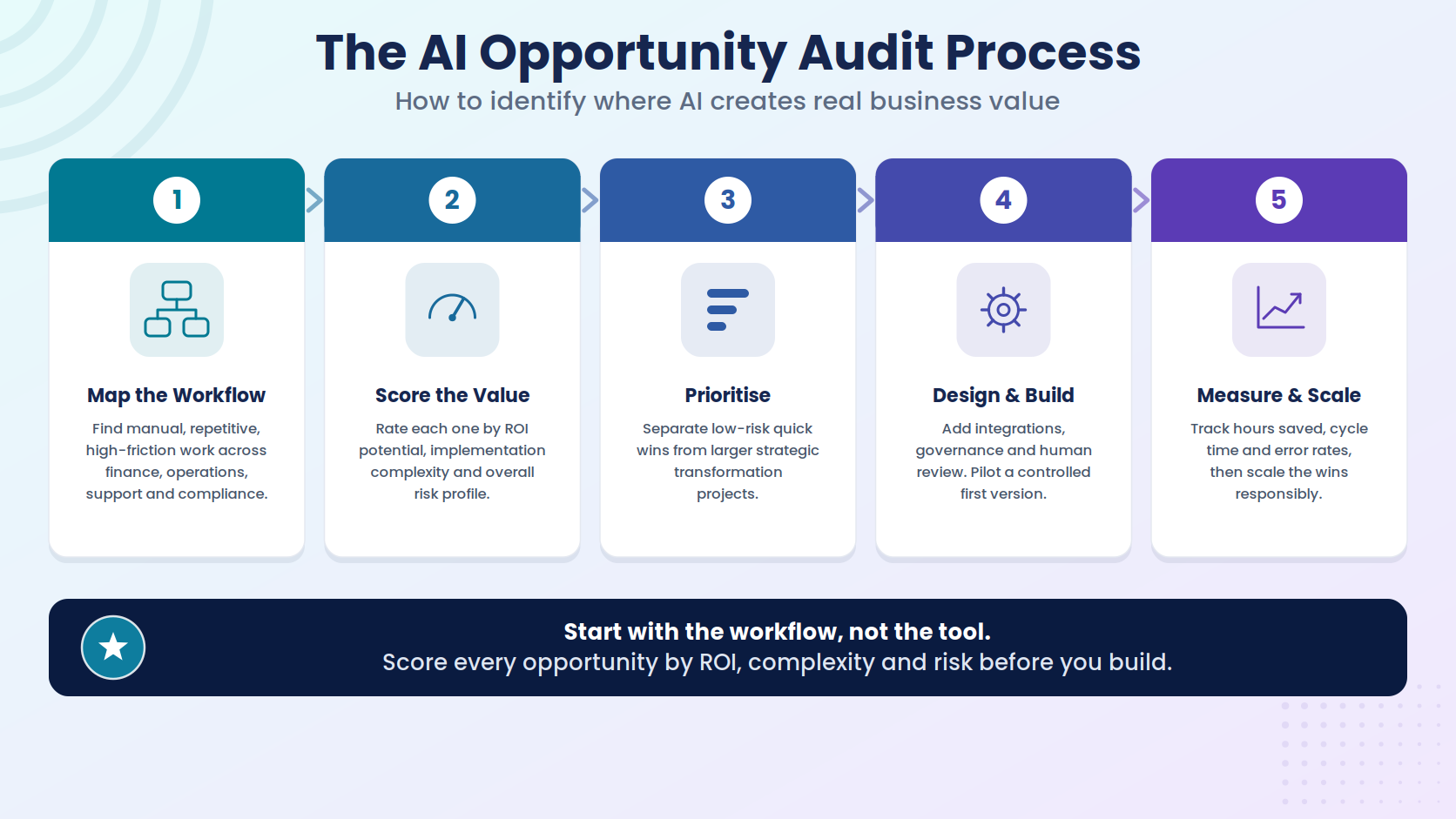
Start with the workflow. Score the opportunity. Assess the risk. Design the future state. Build a controlled first version. Measure the result. Then scale responsibly.
That is how AI becomes a business capability, not just another software subscription.
FAQs
1. What is an AI opportunity audit?
An AI opportunity audit is a structured review of business workflows to identify where AI can create measurable value. It examines manual processes, repetitive tasks, decision points, system gaps, reporting needs, data availability, risk and ROI. The goal is to produce a prioritised list of AI opportunities and a practical implementation roadmap. Rather than asking “Which AI tool should we buy?”, an AI opportunity audit asks “Which workflows are worth improving, and what type of AI-enabled system would create the strongest business outcome?”
2. Why should a business do an AI opportunity audit before buying AI tools?
Many businesses buy AI tools before understanding where AI fits into their operations. This can lead to scattered experimentation, poor adoption and unclear ROI. An AI opportunity audit helps avoid that by identifying high-value workflows first. It clarifies where AI can reduce manual work, improve turnaround times, increase reporting visibility, reduce errors or support better decisions. This gives executives a stronger basis for investment and helps ensure AI implementation is connected to real business problems.
3. What workflows are best suited to AI automation?
The best workflows for AI automation are usually repetitive, information-heavy, rules-based or high-volume. Examples include invoice processing, support ticket triage, document review, CRM updates, compliance evidence collection, reporting, onboarding workflows, knowledge base support and operational exception monitoring. AI is especially useful where work involves classification, summarisation, extraction, drafting, routing, prediction or decision support. However, suitability also depends on data quality, system access, risk level and the ability to define human approval points.
4. How do you measure ROI from an AI opportunity audit?
ROI can be measured by comparing the current workflow baseline with the improved AI-enabled process. Common measures include hours saved, faster cycle times, fewer errors, reduced rework, improved customer response times, better reporting, increased staff capacity and reduced compliance burden. For example, if a workflow takes 50 hours per week and AI reduces manual effort by 40%, the business may recover 20 hours per week. The broader ROI may also include better service quality, faster decisions and reduced operational risk.
5. Should AI opportunities be scored before implementation?
Yes. Scoring helps prioritise AI projects based on business value rather than excitement or internal pressure. A practical scoring model should assess ROI potential, implementation complexity and risk. High-priority opportunities usually have meaningful manual workload, clear repeatability, accessible data, manageable risk and measurable outcomes. Low-priority opportunities may be interesting but difficult to implement, hard to measure or too risky for early adoption.
6. What is the difference between a quick win and a strategic AI project?
A quick win is a smaller, controlled AI initiative that can demonstrate value without major organisational change. Examples include ticket summarisation, policy Q&A, report drafting or invoice data extraction. A strategic AI project is larger and may involve workflow redesign, multiple systems, custom software, dashboards, governance and deeper integrations. A strong AI roadmap usually includes both: quick wins to build confidence and larger projects to create deeper operational transformation.
7. Can AI work with our existing business systems?
Yes, in many cases AI can work with existing systems through APIs, databases, workflow tools, document repositories, CRMs, ERPs, finance platforms, LMSs, help desks and dashboards. The key is integration design. AI becomes much more valuable when it can access the right information, trigger workflow steps, update systems, route exceptions and provide reporting. Without integration, AI often becomes another disconnected tool that staff must manually operate.
8. Is enterprise AI secure?
Enterprise AI can be implemented securely, but security must be designed into the workflow. Important controls include role-based permissions, secure API access, data minimisation, encryption, logging, audit trails, human approval points and monitoring. Security requirements depend on the data involved and the actions the AI system can perform. AI workflows that access sensitive, financial, customer or regulated data require stronger governance than low-risk internal drafting tools.
9. Do we need perfect data before starting with AI?
No, but you do need to understand your data. Some AI workflows can begin with imperfect data, especially if the first version is designed for human review and controlled use. However, poor data quality can limit accuracy, reliability and ROI. An AI opportunity audit should assess where data lives, how accessible it is, whether it is structured or unstructured, who owns it, and whether it is suitable for the proposed workflow.
10. Who should be involved in an AI opportunity audit?
An AI opportunity audit should involve both business and technical stakeholders. This may include executives, department managers, operations staff, finance leaders, IT leaders, compliance staff and the people who perform the workflow every day. Executives understand business priorities, frontline staff understand workflow friction, and technical teams understand systems, data and integration constraints. The strongest audit outcomes usually come from combining all three perspectives.
11. How long should an AI roadmap be?
An AI roadmap should be long enough to guide decision-making but practical enough to act on. It should include a prioritised opportunity register, recommended implementation sequence, business case for priority workflows, technical requirements, governance model and measurement framework. For many mid-sized businesses, a 90-day pilot roadmap plus a 6–12 month strategic roadmap is a useful structure.
12. How does Greenhat support AI opportunity audits?
Greenhat can help businesses identify high-value AI opportunities, map workflows, assess ROI, review technical feasibility, design AI-enabled processes and build secure, integrated solutions. This may include intelligent agents, AI automations, custom software, API integrations, AWS cloud infrastructure, dashboards and governance controls. The focus is on practical implementation: designing AI systems that work inside real business operations and create measurable value.